Rokae+ Plugin Introduction
Overview
-
Rokae+ plugins are extensible software components used to add specific functionality to existing applications or systems without modifying core code. They follow the Open-Closed Principle and interact with the host program through standardized interfaces for flexible extension.
-
Rokae+ plugins are Rokae's dual-end extension system for secondary development. The two ends are independent and can also work together to implement complex process logic. See the Client Plugin and Controller Plugin guides for details.
Client Side
| Item | Description |
|---|---|
| Runtime | Human-machine interface on PC or teach pendant (process package, program editing, status, maintenance, etc.) |
| Client plugin | Developed with the client plugin SDK to extend process UI, human-machine interaction, instruction editing, status display, etc. |
| Main capabilities | Custom UI embedding, data exchange with controller plugins, business data read/write, robot status queries, process instruction UI, events and logging, etc. |
Controller Side
| Item | Description |
|---|---|
| Runtime | Robot controller |
| Controller plugin | Loaded into the controller as a dynamic library to extend low-level control and process execution |
| Main capabilities | Custom process instructions, motion control extension, IO and registers, fieldbus and end tools, controller event callbacks, data services for clients, log reporting, etc. |
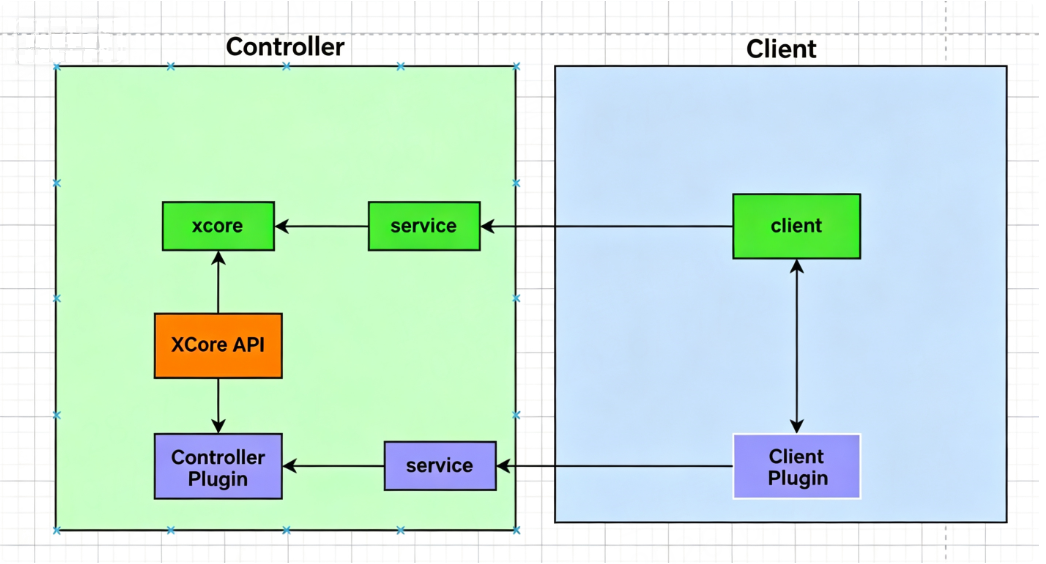
Dual-End Architecture and Communication
Key points for dual-end collaboration:
- Client plugins and controller plugins communicate through an agreed data protocol.
- The client can directly access general business capabilities provided by the controller without relying on a custom controller plugin.
- For protocol and integration details, see Client Interaction and Data Communication.
Plugin Package Format
A plugin package can contain both client and controller plugins. The corresponding archive names must be fixed as client.zip (client) and controller.zip (controller).
Plugin Package.zip
       ├── client.zip
       └── controller.zip
Client plugins and controller plugins can each be loaded independently without depending on the other.
For more details on directory structure, licensing, and configuration fields, see Creating the Plugin Package and Controller Plugin Introduction.
Client Capability Overview
Client plugins are scheduled by the host through the lifecycle (initialization → dependencies ready → UI display → idle → unload cleanup). Common capabilities include:
| Capability | Description |
|---|---|
| UI extension | Embed custom UI into the center area, status bar, right-side expansion, physical buttons, full screen, etc. |
| Dual-end data exchange | Send and receive agreed data with a controller plugin of the same name for configuration, calibration, result feedback, etc. |
| Business data read/write | Read/write or subscribe to general business data on the controller side |
| Control requests | Send modular control or query requests to the controller |
| Robot status | Query network connection, power on/off, manual/auto, IP, model, permission level, etc. |
| Process instruction UI | Register process package instruction groups and property editing UI |
| Events and logging | In-plugin event notification, log output, and data directory access |
For detailed APIs, see API Reference.
Controller Capability Overview
After loading, a controller plugin goes through initialization, start, and stop. Common capabilities include:
| Capability | Description |
|---|---|
| Lifecycle management | Resource initialization and release during plugin load, start, and unload |
| Custom process instructions | Register C++ logic as instructions callable from programs |
| Motion control extension | Issue or extend linear, joint, arc, and other motion capabilities |
| Controller events | Respond to point changes, program start/stop, pause, etc. |
| Status and tasks | Query or control running state, task start/stop, jumps, etc. |
| IO and registers | Read/write digital/analog signals and extended registers |
| Fieldbus and end tools | Operate EtherCAT, fieldbus devices, and end tools |
| Client services | Provide data services to client plugins to support UI-side interaction |
| Logging | Plugin-independent logs and multilingual user log reporting |
For module details, see Controller API Introduction.