Custom Motion Commands
Call flow:
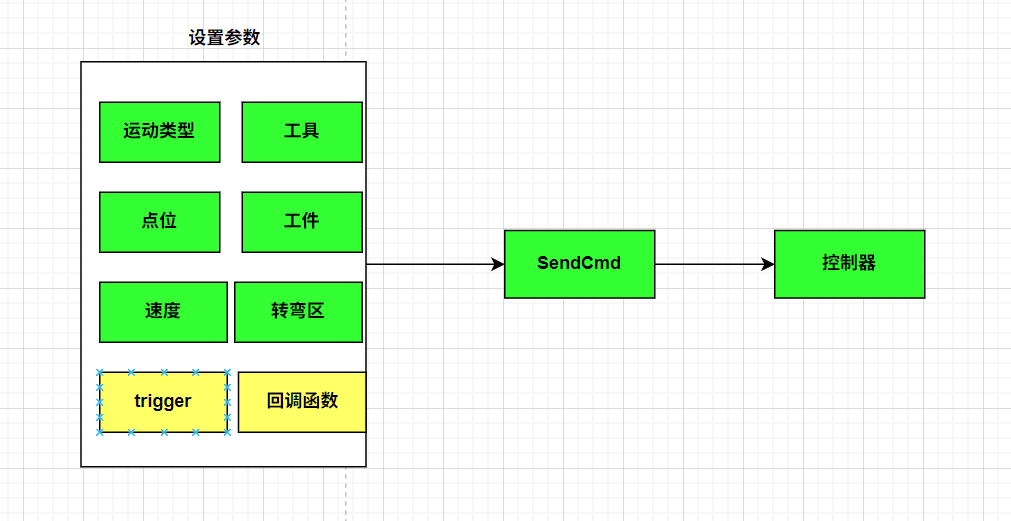
Example of implementing a custom motion command:
Step 1: set motion parameters.
Step 2: call SendCmd to send the command to the controller.
Implement command PMoveL(point,speed,zone,tool,wobj).
This command is similar to the existing MOVEL command. Users can implement custom logic inside the command, for example for welding applications.
/**
 * @brief Implement PMoveL command
 */
void RegPMoveL() {
    // 1. Command configuration: name, trigger mode, task limits, etc.
    RLCmdConfigAPI cfg;
    cfg.SetFuncName("pmovel");
    // Set look-ahead mode to motion command
    cfg.SetLookAhead(CmdLookAheadImplAPI::MOVEMENT_ITSELF) ;
    // Set task limit type
    cfg.SetTaskLimit(TaskLimitAPI::TASK_NO_LIMIT);
    // Set step-back type
    cfg.SetStepBack(StepBackAPI::STEP_BACK_CUSTOM);

    // 2. Create command from configuration
    BEGIN_COMMAND_API(cfg)

    // 3. Configure parameter checkers for the command
    PARAMS_API(
        ArgTypeAPI(ValueTypeAPI::VALUE_ROBTARGET),
        ArgTypeAPI(ValueTypeAPI::VALUE_SPEED),
        ArgTypeAPI(ValueTypeAPI::VALUE_ZONE),
        ArgTypeAPI(ValueTypeAPI::VALUE_TOOL),
        ArgTypeAPI(ValueTypeAPI::VALUE_WOBJ)
    )

    // 4. Forward execution body
    RLCmdActionAPI cmd_func = [=](std::shared_ptr<RLCallFrameAPI> frame,
        std::vector<std::shared_ptr<SymbolVarBaseAPI>> args) -> CommandExecuteAPI {
        // Get parameter data
        auto point = args[0]->GetPointAPI();
        auto speed = args[1]->GetSpeedAPI();
        auto zone = args[2]->GetZoneAPI();
        auto tool = args[3]->GetToolAPI();
        auto wobj = args[4]->GetWobjAPI();

        CommandExecuteAPI cmd_exec = [=]()
        {
            MotionCmdArgsAPI args_api;
            // Set target point
            args_api.SetTargetPoint(point);
            // Set motion type to linear
            args_api.SetMoveType(MoveTypeAPI::MOVE_L);
            // Set tool, work object, speed, and zone
            args_api.SetTool(tool);
            args_api.SetWobj(wobj);
            args_api.SetZone(zone);
            args_api.SetSpeed(speed);
            // Set pointer for current execution position
            args_api.SetUpdatePointer(frame->GetCmdTask(), frame->GetCmdFile(), frame->GetCmdLine());
            // Set trigger
            TriggerAPI t;
            t.type = TriggerAPI::TriggerType::DISTANCE;
            t.reference_is_from_start = true;
            t.value_from_reference = 0.1;
            t.trigger_callback = [=]
            {
                LOG_DEBUG<<frame->GetCmdTask()<<" "<<frame->GetCmdFile()<<" "<<frame->GetCmdLine()<<" 100mm trigger callback";
            };
            args_api.SetTriggers({t});
            // Set path callbacks
            args_api.SetCallback(CallBackTypeAPI::MOVE_START,[]{LOG_INFO<<"movel start callback";});
            args_api.SetCallback(CallBackTypeAPI::MOVE_FINISH,[]{LOG_INFO<<"movel finish callback";});
            args_api.SetCallback(CallBackTypeAPI::MOVE_PAUSE,[]{LOG_INFO<<"movel pause callback";});
            MotionCmdAPI api;
            // Send command
            int ret = api.SendCmd(args_api);
            LOG_INFO<<"send motion cmd:"<<ret;
            LOG_DEBUG<<"point:"<<point<<" speed:"<<speed<<" zone:"<<zone
                <<" tool:"<<tool<<" wobj:"<<wobj;

            LOG_DEBUG<<":"<<frame->GetCmdTask()<<" "<<frame->GetCmdFile()<<" "<<frame->GetCmdLine();
            if (ret == 0){
                return CommandProcessResultAPI::CMD_PROCESS_EXTRA;
            }else{
                return CommandProcessResultAPI::CMD_PROCESS_ERROR;
            }
        };
        return cmd_exec;
    };
    EXECUTE_API(cmd_func)

    // 5. Register the command with the controller
    REGISTER_COMMAND_API
}
After these steps, a new motion command is created and PMoveL can be called from RL.
For more command usage, see examples/motion_cmd.cpp.