10.9 RCI settings
RCI is an external control interface, and the RCI communication setting is required before use. Only collaborative models support this feature.
On the HMI main interface, you can enter the RCI settings interface through the menu "Communication" -> "RCI settings", as shown in the following figure:
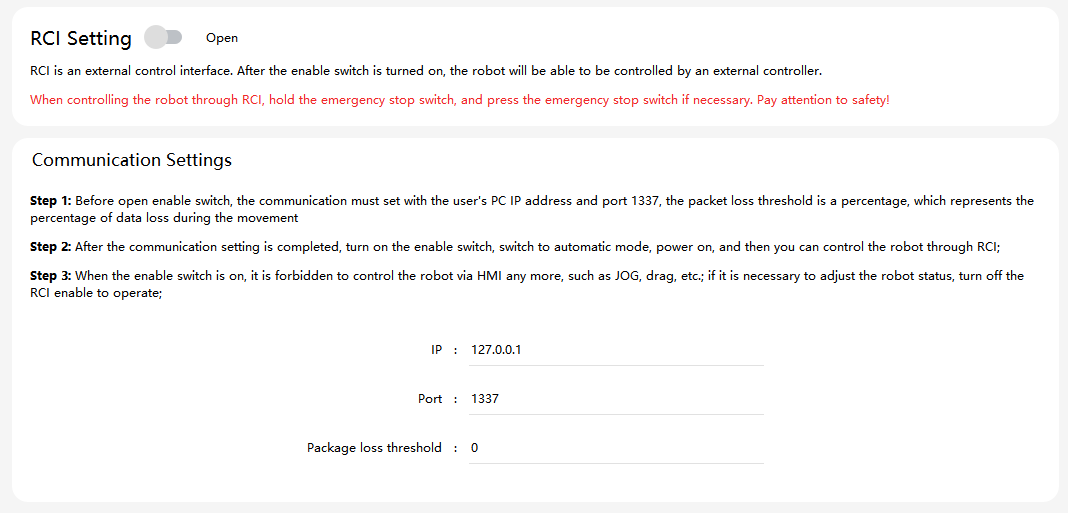
The parameters that need to be set are shown in the table below:
| Parameters | Explanation |
|---|---|
IP |
If the user PC is directly connected to the robot via network cable, the IP address of the user PC should be in the same network segment as the IP of the robot; if the user PC is connected to the robot via wireless or router, the user PC should be in the same LAN as the robot. |
Port |
The port number is set to 1337 by default. |
Packet loss threshold |
The packet loss threshold is in percentage, which represents the packet loss rate during RCI communication. For example, when the packet loss threshold is set to 10, it means that the packet loss rate during RCI usage should not exceed 10%. The packet loss threshold is recommended to be set between 10−20. |
Refer to the RCI User Manual for detailed RCI usage and routines.