10.4.1 Overview
The xCore system provides a Tcp Socket-based external communication interface supporting both server and client through which host systems (PLC, MES, etc.) can send control commands to the robot or obtain the robot status.
10.4.2 Configurations
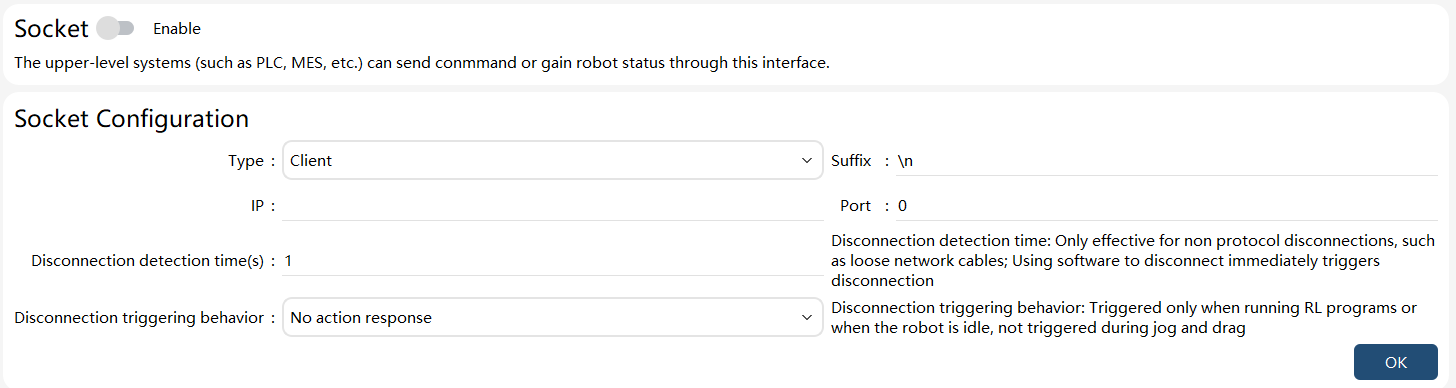
Before using the interactive commands, configure the parameters related to the Socket communication and enable the function. The configuration interface is located in HMI →"Communication" → "External Communication", as shown in the following figure:
Note:
The Socket communication interface supports the robot to serve as a client or server, but only one state at a time.
When the robot is used as a client, the following parameters need to be configured:
| Parameters | Explanation |
|---|---|
IP |
Server IP, such as the IP address of the connected PLM and MES systems. |
Port |
Server-side listening port |
Suffix |
When the server sends control or monitoring commands to the robot, an additional suffix character is required at the end of the command. They are typically simple terminators such as \r, \n, or \t. Please note that combined suffixes can be used here without limitation on length, such as \r\n, \r\t, or \r\n\t. Visible characters such as letters can also be used. |
The robot used as a server supports multiple connections. In this case, please pay attention to the control sequence on the client side to avoid any conflict. The following parameters need to be configured:
| Parameters | Explanation |
|---|---|
Port |
Server-side listening port |
Suffix |
When the server sends control or monitoring commands to the robot, an additional suffix character is required at the end of the command. They are typically simple terminators such as \r, \n, or \t. Please note that combined suffixes can be used here without limitation on length, such as \r\n, \r\t, or \r\n\t. Visible characters such as letters can also be used. |
10.4.3 Interactive commands
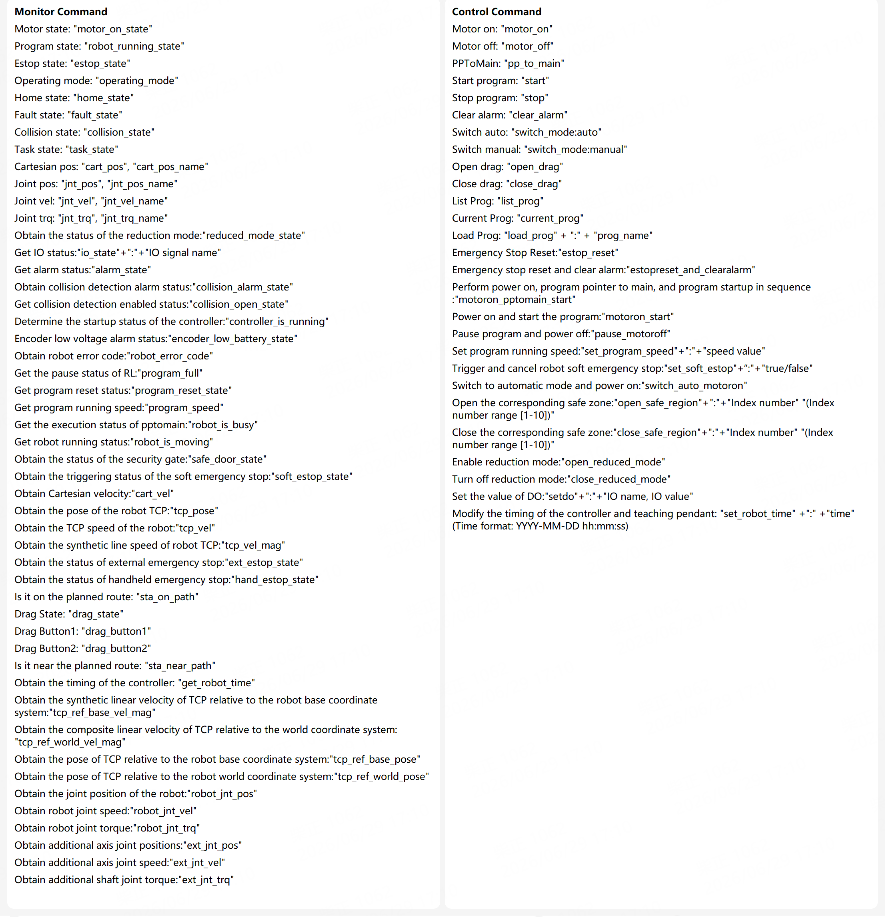
Interactive commands include control commands and monitoring commands.
The following table gives the specific command content and format. (Assuming the user uses "\r" as the specified command terminator, "\r" is an escape character representing carriage return, and the decimal value is 13).
Control commands:
Command name |
String sent |
Return value |
Remarks |
Close the socket interface |
“xCore::SocketInterface::Disable” +“\r” |
No return value |
|
Start the socket interface |
“xCore::SocketInterface::Enable” +“\r” |
No return value |
|
Start program |
“start”+“\r” |
"true" if success; |
It is not allowed to start the program through system IO when the register equipped with the pause function or system IO has not been reset; |
Stop program |
“stop”+“\r” |
"true" if success; |
|
Clear servo alarms |
“clear_alarm”+”\r” |
"true" if success; |
|
Program pointer to main |
“pp_to_main”+“\r” |
"true" if success; |
|
Motor power-on |
“motor_on”+“\r” |
"true" if success; |
|
Motor power-off |
“motor_off” + “\r” |
"true" if success; |
|
Switch to Manual mode |
“switch_mode:manual”+”\r” |
"true" if success; |
|
Switch to Automatic mode |
“switch_mode:auto”+”\r” |
"true" if success; |
|
Enable Drag mode |
“open_drag”+”\r” |
"true" if success; |
Collaborative robot only |
Disable Drag mode |
“close_drag”+”\r” |
"true" if success; |
Collaborative robot only |
Obtain project list |
list_prog + “\r” |
Return to project list; |
|
Obtain current project |
current_prog + “\r” |
Return to current load project; |
|
Switch to project |
load_prog + (project name) + "\r" |
"true" if success; |
|
Set DO value |
"setdo:" + "IO name, IO value" + "\r" |
"true+r" if successful |
"setdo: DO0-0, true\r" |
Update the time on the controller and teach pendant |
set_robot_time:time + "+r" (time format:Y YYY-MM-DD hh:mm:ss) |
"true" if success; |
|
Emergency reset |
estop_reset + “\r” |
"true" if success; |
(RSC only, not applicable to mini board) |
Emergency & clear alarm |
estopreset_and_clearalarm +“\r” |
"true" if success; |
|
Power on, program pointer to main, and start program in order |
motoron_pptomain_start +“\r” |
"true" if success; |
After triggering the function code, if the teach pendant displays the alarm "Program not synchronized to controller, startup failed", synchronize the program and retrigger the function code; |
Power on and start program in order |
motoron_start +“\r” |
"true" if success; |
After triggering the function code, if the teach pendant displays the alarm "Program not synchronized to controller, startup failed", synchronize the program and retrigger the function code; |
Pause program and power down in order |
pause_motoroff +“\r” |
"true" if success; |
|
Set program running rate |
set_program_speed: +program speed +"\r" |
"true" if success; |
|
Trigger and release robot soft E-stop |
set_soft_estop:true/false +“\r” |
"true" if success; |
|
Execute switch to automatic mode and then power on |
switch_auto_motoron +“\r” |
"true" if success; |
|
Open the corresponding safe region |
open_safe_region: +safe region index+"\r" |
"true" if success; |
Index range [1-10] |
Close the corresponding safe region |
close_safe_region: +safe region index+"\r" |
"true" if success; "false" if failed |
Index range [1-10] |
Enable reduced mode |
open_reduced_mode +“\r” |
"true" if success; |
|
Disable reduced mode |
close_reduced_mode +“\r” |
"true" if success; |
Monitoring commands:
Command name |
String sent |
Return value |
Remarks |
Motor power state |
“motor_on_state” + “\r” |
"true" if success, motor power-on; |
|
Program status |
“robot_running_state” + “\r” |
"true" if success, running; |
|
EStop state |
“estop_state” + “\r” |
When the emergency stop trigger level type is set to high: true, emergency stop; false, non-emergency stop. |
The return value of this state is affected by the "Emergency Stop Trigger Level Type" setting. When it is set to high level, the output is valid when triggering a soft emergency stop, and invalid when not triggered; when it is set to low level, the output is invalid when triggering a soft emergency stop, and valid when not triggered. |
Fault |
“fault_state” + “\r” |
"true" if success, fault; |
|
Operating mode |
“operating_mode” + “\r” |
"true" if success, automatic mode; |
|
Get Cartesian position |
“cart_pos” + “\r” |
Cartesian position string + "\r"; |
|
Get Cartesian position |
“cart_pos_name” + “\r” |
"cart_pos: " + Cartesian position string + "\r"; |
|
Get axis position |
“jnt_pos” + “\r” |
Axis position string + "\r"; |
|
Get axis position |
“jnt_pos_name” + “\r” |
"jnt_pos: " + axis position string +"\r"; |
|
Get axis velocity |
“jnt_vel” + “\r” |
Axis speed string + "\r"; |
Unit: rad/s |
Get axis velocity |
“jnt_vel_name” + “\r” |
"jnt_vel: "+ axis speed string + "\r"; |
Unit: rad/s |
Get axis torque |
“jnt_trq” + “\r” |
Axis torque string + "\r"; |
Unit: N.m |
Get axis torque |
“jnt_trq_name” + “\r” |
"jnt_trq:" + axis torque string + "\r"; |
Unit: N.m |
Home state output |
“home_state” + “\r” |
"true" with output; |
|
Collision detection state |
“collision_state” + “\r” |
"true" if trigger collision; |
Collaborative robot only |
Obtain robot task state |
“task_state” + “\r” |
The task currently performed by the robot. These include: |
Please refer to the "HMI Introduction" for the icon and description of the current status of the robot |
Obtain alarm state |
“alarm_state”+”\r” |
"true" if there is an alarm, "false" if no alarm is present |
|
Obtain collision detection alarm state |
“collision_alarm_state” + ”\r” |
"true" if there is an alarm, "false" if no alarm is present |
|
Obtain collision detection enable state |
“collision_open_state” + ”\r” |
"true" if collision detection is enabled |
|
Check if the controller is powered on |
“controller_is_running”+ ”\r” |
"true" if powered on |
|
Low-voltage alarm state of encoder |
“encoder_low_battery_state”+ ”\r” |
"true" if there is a low voltage alarm |
|
Obtain robot error code |
“robot_error_code” + ”\r” |
"robot error code" if an error is present |
|
Obtain pause state of RL |
“program_full” + ”\r” |
Pause state of RL, including: |
|
Obtain program reset state |
“program_reset_state”+ ”\r” |
Output "true" if the program pointer is at the first line of the main function and the program has not started running; otherwise, output "false" |
|
Obtain the actual speed of the current program execution |
“program_speed” + “\r” |
Actual speed of the current program execution Range: 1 to 100 |
|
Obtain program busy state |
“robot_is_busy” + “\r” |
"true" if currently in pptomain |
Obtain whether the robot is executing time-consuming operations such as pptomain |
Obtain whether the robot is in motion |
“robot_is_moving” + ”\r” |
"true" if the robot is moving |
|
Obtain safety gate state |
“safe_door_state” + ”\r” |
"true" if safety gate is open |
|
Obtain soft E-stop trigger status |
“soft_estop_state” + ”\r” |
"true" if the soft E-stop is triggered; otherwise, "false" |
|
Obtain Cartesian velocity |
“cart_vel” + “\r” |
Cartesian velocity+"+r" |
|
Obtain the pose of the robot’s TCP |
“tcp_pose” + “\r” |
Pose of the robot’s TCP+"\r" |
|
Obtain the velocity of the robot’s TCP |
“tcp_vel” + “\r” |
Velocity of the robot’s TCP+"\r" |
|
Obtain the composite linear velocity of the robot’s TCP |
“tcp_vel_mag” + “\r” |
Composite linear velocity of the robot’s TCP+"\r" |
|
Obtain external E-stop state |
“ext_estop_state” + “\r” |
"true" if the external E-stop is triggered |
The safeboard is a mini board, and the firmware version is not less than 1.0.8.7 |
Obtain handheld E-stop state |
“hand_estop_state” + “\r” |
"true" if the handheld E-stop is triggered |
The safeboard is a mini board, and the firmware version is not less than 1.0.8.7 |
Obtain collaboration mode state |
“collaboration_state” + “\r” |
"true" if collaboration mode is triggered |
|
Obtain reduced mode state |
reduced_mode_state + “\r” |
"true" if it is enabled; "false" if it is not enabled |
|
Obtain IO state |
io_state: + IO names (multiple IOs separated by commas) + "\r" |
Return IO values as "true" or "false"; "null" if the corresponding IO is not found |
|
On path verification |
“sta_on_path” + “\r” |
"true" if on path |
Refer to register function code "sta_on_path" for detailed usage |
Near path point verification |
“sta_near_path” + “\r” |
"true" if near path point |
Refer to register function code "sta_near_path" for detailed usage |
Obtain controller time |
“get_robot_time”+“\r" |
Return the current controller time. "false" if it failed |
|
Drag status |
”drag_state“ + “\r” |
"true" if the drag switch is on |
Only applicable for collaborative models |
Status of drag button 1 |
”drag_button1“ + “\r” |
"true" if the drag button 1 is pressed |
Only applicable for collaborative models |
Status of drag button 2 |
”drag_button2“ + “\r” |
"true" if the drag button 2 is pressed |
Only applicable for non-SR collaborative models; for CR models with only one drag button, "true" if either drag_button1 or drag_button2 is pressed |
Obtain the resultant linear velocity of the TCP relative to the robot base frame |
“tcp_ref_base_vel_mag”+ “\r” |
Resultant linear velocity of the TCP relative to the robot base frame + "\r" |
float type, in mm/s; |
Obtain the resultant linear velocity of the TCP relative to the robot world frame |
“tcp_ref_world_vel_mag”+ “\r” |
Resultant linear velocity of the TCP relative to the robot world frame + "\r" |
float, in mm/s; |
Obtain the pose of the TCP relative to the robot base frame |
“tcp_ref_base_pose”+ “\r” |
Pose of the TCP relative to the robot base frame + "\r" |
float array with a length of 7 (position in mm, quaternion) |
Obtain the pose of the TCP relative to the robot world frame |
“tcp_ref_world_pose“+ “\r” |
Pose of the TCP relative to the robot world frame + "\r" |
float array |
Obtain the robot joint position |
“robot_jnt_pos“+ “\r” |
Robot joint position + "\r" |
float array |
Obtain the robot joint velocity |
“robot_jnt_vel“+ “\r” |
Robot joint velocity + "+r" |
float array |
Obtain the robot joint torque |
“robot_jnt_trq“+ “\r” |
Robot joint torque + "\r" |
float array |
Obtain additional axis joint position |
“ext_jnt_pos“+ “\r” |
Additional axis joint position + "\r" |
float array |
Obtain additional axis joint velocity |
“ext_jnt_vel“+ “\r” |
Additional axis joint velocity + "\r" |
float array |
Obtain additional axis joint torque |
“ext_jnt_trq“+ “\r” |
Additional axis joint torque + "\r" |
float array |
Note:
String format |
Unit |
|
Cartesian position |
x、y、z、a、b、c、q1、q2、q3、q4 |
x, y, and z in mm; |
Axis position |
j1、j2、j3、j4、j5、j6、j7 |
Robot axis angle in rad; |
Axis velocity |
vj1、vj2、vj3、vj4、vj5、vj6、vj7 |
Robot velocity angle in rad/s; |
Axis torque |
tj1、tj2、tj3、tj4、tj5、tj6、tj7 |
The unit of the robot axis and additional axis torque is the thousandth of the rated torque of the motor; |