10.3.1 Overview
The xCore system provides cross connections, which enable logical connections and processing between different input and output signals, allowing flexible connections among physical I/O, virtual I/O, and register signals.
Cross connections are suitable for establishing logical relationships between digital I/O signals (DI, DO) or grouped I/O signals (GI, GO). With this function, status changes in one or more I/O signals can automatically affect the status of other I/O signals, thereby achieving logical linkage among I/O signals.
When it is necessary to establish relationships among multiple I/O signals, and the robot control system is required to process the I/O logic without executing any program code, cross connections offer a simplified and efficient solution.
In typical application scenarios, if a process involves an I/O signal that, when activated, needs to automatically trigger changes in one or more I/O signals, this function can be implemented using cross connections as an alternative to program-based logic control.
10.3.2 Configurations
On the "Communication" → "Cross-connection" page, you can view existing cross-connections and perform adding, editing, and deleting.
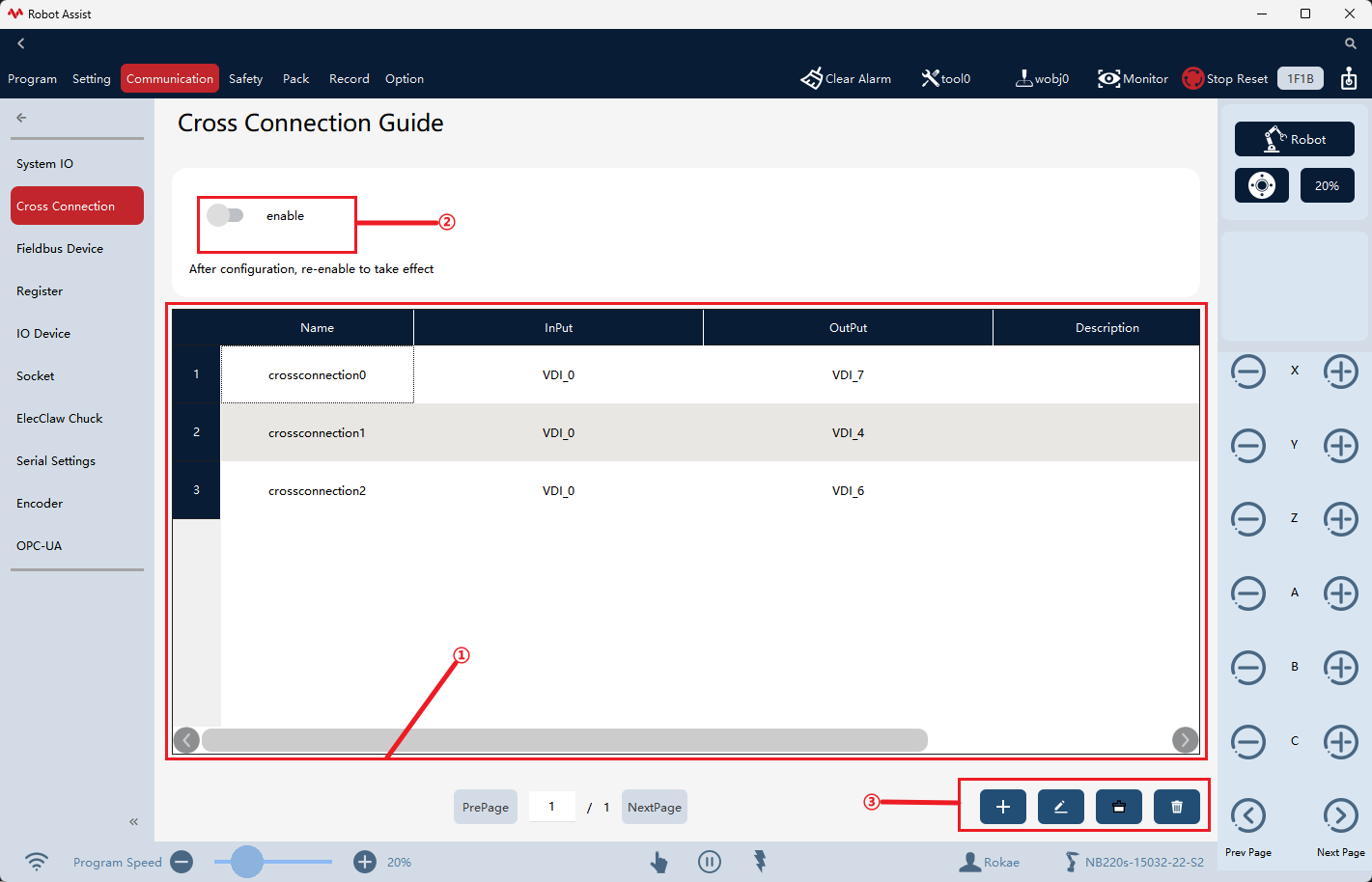
① |
Cross-connection configuration list. |
② |
When activating/deactivating the cross-connection button, newly created cross-connections will not take effect immediately; you need to re-activate the button for them to enable. This button will record its activation status. After restarting the controller, the cross-connections will remain in their last activated/deactivated state. |
③ |
The cross-connection operation buttons, from left to right, are Create, Edit, Multi-select, and Delete. |

| Parameter | Explanation |
|---|---|
Name |
Duplicate names are not allowed in the list. |
Input |
The logical expression is composed of input signals, supports operations such as !, &&, and ||, allows a maximum selection of 5 input signals, with supporting types including DI, DO, GI, GO, and registers. |
Output |
Output signal name. |
Description |
Add a description for each connection as a remark. |
10.3.2.1 Signal connection
Click on "Create" or "Edit" to enter the signal connection configuration interface. After each edit is completed, click "Confirm" to perform configuration inspection. If the configuration is valid, it will be synchronized to the controller, and the user can restart by pressing the button to restart and apply the new configuration. If there are any violations of the configuration, you need to check the pop-up window and log to handle errors. Clicking "Cancel" will invalidate the current edit.
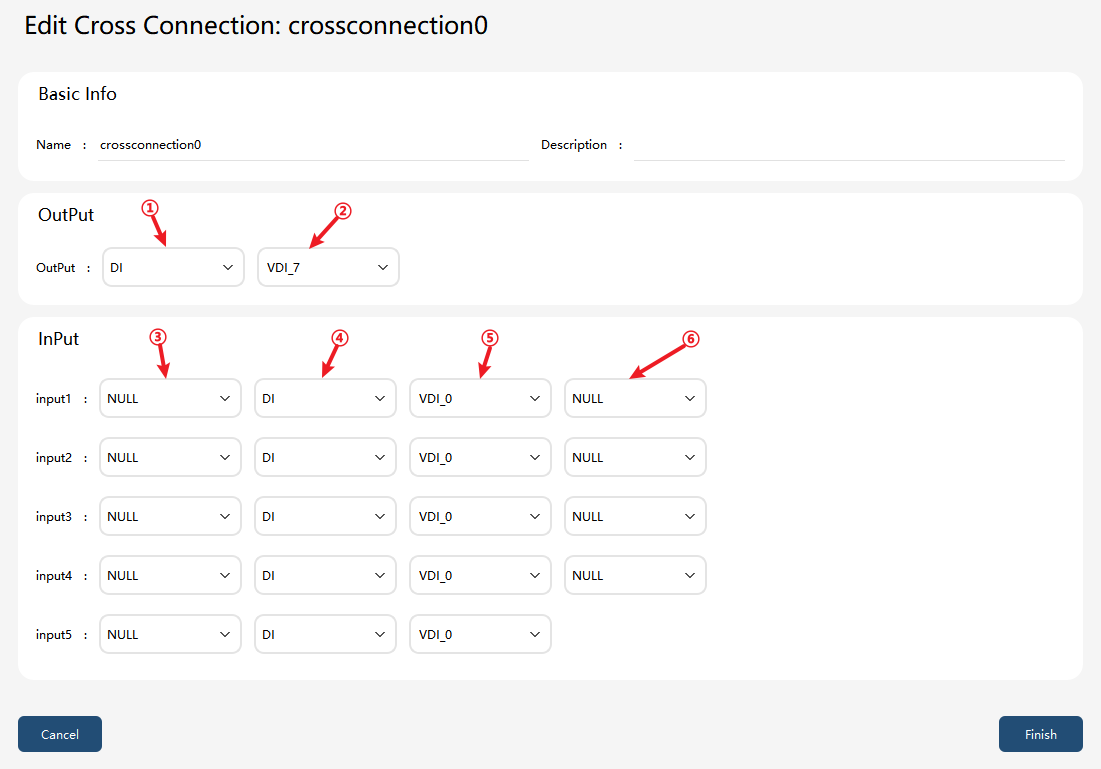
① |
Output signal type, including DI/DO/GI/GO/register |
② |
Output signal name, not supporting binding system DO |
③ |
Whether the input signal is reversed |
④ |
Input signal type, including DI/DO/GI/GO/register |
⑤ |
Input signal name |
⑥ |
Logical operator (supporting || and &&); selecting NULL will invalidate the configuration on the next row |
10.3.2.2 System limitations and rules
To ensure the certainty and real-time nature of logic calculations for cross-connections, as well as the operation safety of the system, the xCore system imposes the following rules regarding the configuration and use of cross-connections:
Rules |
Explanation |
No closed logical chains (loops) |
Closed loops are not allowed to form between cross-connections. Closed logical chains will lead to signals being evaluated infinitely, which may cause signal oscillations or system anomalies. Therefore, the system will reject such configurations. |
Output signal uniqueness constraint |
Across the entire system, multiple cross-connections are not allowed to generate the same output I/O signal. If multiple cross-connections simultaneously write to the same output signal, uncertain results may occur, and the system will deem such a configuration invalid. |
Input and output shall differ |
In a single cross-connection, the I/O signal configured as input shall not be the same as the output I/O signal of that cross-connection to prevent the formation of direct logical loops. |
GI/GO/Register operations |
When GI, GO, or non-bit register signals are used in cross-connections, only their least significant bit is included in logical operations, while the remaining bits are not included in the calculation. |
Forwarding rules |
If only one input signal is configured in a cross-connection and no logical operators are set, the cross-connection will be considered a forwarding connection, and the state of the output signal will remain consistent with that of the input signal. |
Output signal restrictions |
|
Notes:
-
To prevent abnormal situations, it is strongly recommended to select virtual IO or universal IO as the cross-connection binding signal source.
-
When creating, deleting, or editing a cross-connection configuration, the button in the upper left corner must be reactivated to apply the latest configuration.
-
When deleting, editing, or adding signals while the cross-connection is enabled, the cross-connection will automatically restart.
-
When the cross-connection is enabled, if the project switching/reloading or pptomain is performed, the cross-connection will automatically restart.