奇异规避指令
15.4.7 Singularity avoidance command
15.4.7.1 SingAreaLockAxis4
Explanation |
This command indicates the use of locking the 4-axis method to avoid robot wrist singularities. |
Definition |
SingAreaLockAxis4(on/off ); SingAreaLockAxis4 on indicates the enabling of the 4-axis locking to avoid wrist singularity function. It should be noted that this function can only be enabled when the 4-axis of the robot is at 0° or ±180°. It is necessary to ensure that the 4-axis is at the target point of the previous motion command of SingAreaLockAxis4 on or that the 4-axis of the robot is already at the above angle to ensure normal program operation, otherwise, an error will be reported. Off, the function is turned off. Note: The Cartesian motion command between SingAreaLockAxis4 on and SingAreaLockAxis4 off adopts a special interpolation method for its pose, without changing the motion angle of the 4-axis. Any motion command attempting to change the 4-axis angle will cause an error. At the same time, this command is designed as a blocking command, which will interrupt the turning zone between the front and rear motion commands of SingAreaLockAxis4. The current version is applicable to industrial standard six-axis series (XB, NB models) and collaborative xMateCR, xMateSR series (excluding 5-axis models). This command is not supported when full DH compensation is enabled. |
Example |
Example 1 MoveAbsJ(p1,v1000, z50, tool0); SingAreaLockAxis4(on); MoveL(p2,v1000, z50, tool0); MoveL(p3,v1000, z50, tool0); SingAreaLockAxis4(off); MoveL(p5, v1000, z50, tool0); Point position p1 needs to ensure that the 4-axis angle is 0° or ±180°. When running to SingAreaLockAxis4, the 4-axis locking for wrist singularity avoidance function is enabled. The MoveL p2 and MoveL p3 will adopt the special interpolation method for their poses to maintain the 4-axis angle unchanged. SingAreaLockAxis4 off indicates to close the function. |
15.4.7.2 SingAreaJointWay
Explanation |
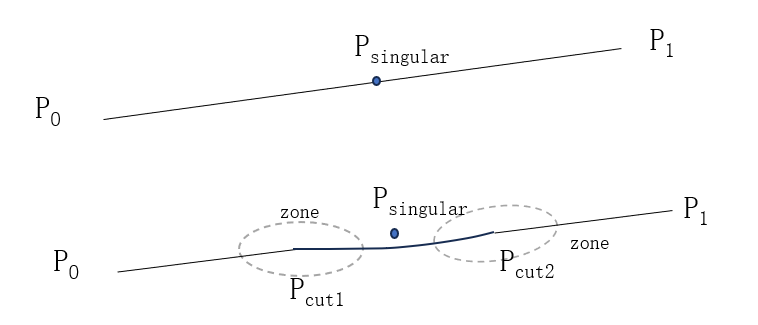
It indicates the use of joint space trajectory interpolation to avoid singularities in Cartesian commands. The Cartesian motion command between SingAreaJointWay on and SingAreaJointWay off will be automatically detected by the control system for any singularity. If the trajectory does not contain singularities, it will move in the same way as a normal trajectory. If it contains singularities, it will move in a unique pattern specific to the mode. See below for details: The motion of robot near singularities usually involves a large range of joint angles, so when using this command, it is necessary to confirm whether the robot’s motion trajectory meets the requirements. Note: The current version is applicable to industrial standard six-axis series (XB, NB models). |
Definition |
SingAreaJointWay(on/off, zone); on/off, to indicate that the joint interpolating singularity is enabled or disabled. Zone, to indicate the radius of the turning zone for the three trajectory segments P0Pcut1, Pcut1Pcut2, and Pcut2P1 after cutting, as shown in the above figure, referring to the definition of the turning zone. |
Example |
Example 1 MoveAbsJ(p1,v1000, z50, tool0); SingAreaJointWay(on, 50); MoveL(p2,v1000, z50, tool0); MoveL(p3,v1000, z50, tool0); SingAreaJointWay(off); MoveL(p5, v1000, z50, tool0); In the above commands, SingAreaJointWay on, 50 enables singularity avoidance and specifies an internal turning radius of 50 mm for singularity avoidance. SingAreaJointWay off disables singularity avoidance, and the motion commands in between will use the method of joint interpolating singularity avoidance for motion. |
15.4.7.3 SingAreaWrist
Explanation |
This command indicates using sacrifice orientation to avoid singularities in Cartesian commands. The Cartesian motion commands between SingAreaWrist on and SingAreaWrist off both use sacrifice orientation to move. In this case, the robot tool follows the correct and precise trajectory motion, but the shape of the robot’s wrist will be altered. When the singularity is not traversed, the above situation will also occur. The robot uses sacrifice orientation to move, and the wrist orientation of the robot may have a large range of motion. Therefore, when using this command, it is necessary to confirm whether the robot’s motion trajectory meets the requirements. Note: The current version is applicable to industrial standard six-axis series (XB, NB models) and collaborative xMateCR, xMateSR series. |
Definition |
SingAreaWrist(on/off, limit); on/off, to indicate that the sacrifice orientation for singularity avoidance is enabled or disabled. Limit, the value in degrees that represents the maximum allowable sacrifice orientation. |
Example |
Example 1 MoveAbsJ (p1,v1000, z50, tool0); SingAreawrist (on, 30); MoveL (p2,v1000, z50, tool0); MoveL (p3,v1000, z50, tool0); SingAreaWrist off; MoveL (p4,v1000, z50, tool0); In the above commands, SingAreaWrist on, 30 enables singularity avoidance and specifies the maximum sacrifice orientation of 30 degrees for singularity avoidance. SingAreaWrist off disables singularity avoidance, and the motion commands in between will use the method of singularity avoidance for motion. Please note that the turning zone between p1 and p2 and between p2 and p3 can be generated normally, while the turning zone between p3 and p4 cannot be generated. |
Attention |
It can only be used for linear motion, not for curved motion. When using the sacrifice orientation for singularity avoidance function, the teaching point will be changed when it is within the singularity range. The wrist orientation during motion may sometimes differ from the taught orientation, not only at the teaching points where singularities are traversed, but also potentially at subsequent teaching points. The motion of the orientation near the singularity may differ between single-step motion and continuous motion. |