trigger-指令
15.4.3 Trigger command
15.4.3.1 TrigIO
Explanation |
TriggIO is used to set a trigdata as an output I/O trigger during the motion. Digital output DO and digital group output GO are supported. |
Definition |
TrigIO (TrigData, Distance, RefStart, SignalName, Value); TrigData, data type: trigdata, a variable used to store the trigger data set by this TrigIO; Distance, data type: double, non-negative (negative numbers are treated as 0), to define the location offset of the trigger event on the path. Whether the location offset is relative to the path start or end is defined by RefStart; RefStart, data type: bool, to define whether the trigger position is relative to the start point (true) or the end point (false); SignalName, data type: signaldo or signalgo, the signal name of the digital output or digital group output associated with this defined IO event, which must be an output signal that has been set correctly; //add Value, data type: bool or int, to define the target value of the output signal when an IO event is triggered. The data type of the given value should match the SignalName type. |
Example |
Refer to the TrigL example |
15.4.3.2 TrigReg
Explanation |
TrigReg is used to set a trigdata to modify the register value during the motion; register types supported include int16, bool, float, and bit. |
Definition |
TrigReg (TrigData, Distance, RefStart, RegName, Value); TrigData, data type: trigdata, a variable used to store the trigger data set by this TrigIReg; Distance, data type: double, non-negative (negative numbers are treated as 0), to define the location offset of the trigger event on the path. Whether the location offset is relative to the path start or end is defined by RefStart; RefStart, data type: bool, to define whether the trigger position is relative to the start point (true) or the end point (false); RegName, the register name, and the data type is not available. Note: Registers can not be created in RL. The user needs to create new registers through "Robot -> Communication -> Register"; Value, data type: int16, bool, float, or bit, to define the target value of the register when a register modification event is triggered. The data type of the given value should match the RegName type; if the value specified by the user mismatches with the register type, the type will be transformed automatically; |
Example |
Refer to the TrigL example |
15.4.3.3 TrigVar
Explanation |
TrigVar is used to set a trigdata to modify the RL variables during the motion, and the type of RL variables includes bool, byte, int, and double. |
Definition |
TrigVar (TrigData, Distance, RefStart, VarName, Value); TrigData, data type: trigdata, a variable used to store the trigger data set by this TrigVar; Distance, data type: double, non-negative (negative numbers are treated as 0), to define the location offset of the trigger event on the path. Whether the location offset is relative to the path start or end is defined by RefStart; RefStart, data type: bool, to define whether the trigger position is relative to the start point (true) or the end point (false); VarName, name of the RL variable to be modified, without any data type; Value, data type: bool, byte, int, and double, used to define the target value of the RL variable when a RL variable modification event is triggered. The data type of the given value should match the VarName type, and if the value specified by the user mismatches with the RL variable type, the type will be transformed automatically. |
Example |
Refer to the TrigL example |
15.4.3.4 TrigL
Explanation |
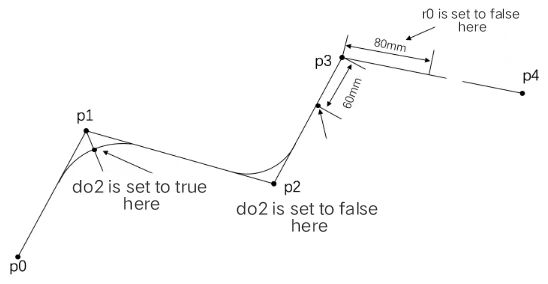
Like MoveL, TrigL is a command to perform linear motion in space. The difference is that TrigL can perform predefined operations at several specified positions during the motion; the two commands are the same in the number and meaning of other parameters. |
Definition |
TrigL (ToPoint, Speed, Trigger, Zone, Tool,[Wobj]); ToPoint, target pose, data type: robtarget, the target pose described in the Cartesian space; Speed, type: speed, to specify the motion speed of the robot when it executes MoveL, including the translation speed of the robot end-effector, the rotation speed, and the motion speed of the external axis; Trigger, trigger condition and action, data type: trigdata; trigdata must be the trigdata processed with TrigX command; otherwise, the compiler will report an error when coming to this line. Zone, turning zone, data type: zone, to define the size of turning zone for the current trajectory; Tool, type: tool;
|
Example 1 VAR trigdata tc1 VAR trigdata tc2 VAR trigdata tc3 … //Set tc1, tc2, tc3 TrigIO (tc1, 0, true, do2, true); TrigIO (tc2, 60, false, do2, false); TrigVar (tc2, 60, false, Bool0, false); //Bool0 is a RL variable in bool type TrigReg (tc3, 80, true, r0, false); //r0 is a bool type register … //Motion MoveL (p1,v500, z50, tool1); TrigL (p2,v500, tc1, z50, tool1); TrigL (p3,v500, tc2, fine, tool1); TrigL (p4,v500, tc3, fine, tool1);
|

15.4.3.5 TrigC
Explanation |
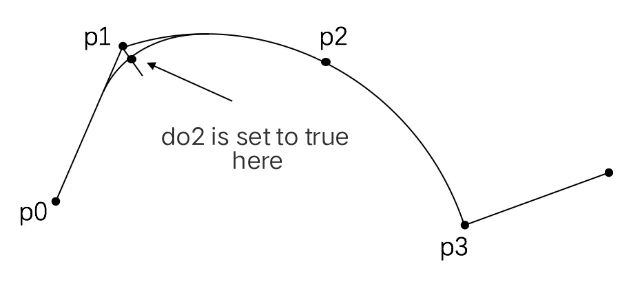
TriggC is similar to MoveC in that it is a command to execute circular motion. The difference is that TriggC can perform predefined operations at several specified positions during the motion; the two commands are the same in the number and meaning of other parameters. |
Definition |
TrigC (AuxPoint, ToPoint, Speed, Trigger, Zone, Tool, [Wobj]); AuxPoint, Auxiliary Point, data type: robtarget, the target pose described in the Cartesian space; ToPoint, target pose, data type: robtarget, the target pose described in the Cartesian space; Speed, type: speed, to specify the motion speed of the robot when it executes MoveL, including the translation speed of the robot end-effector, the rotation speed, and the motion speed of the external axis; Trigger, trigger condition and action, data type: trigdata; trigdata must be the trigdata processed with TrigX command; otherwise, the compiler will report an error when coming to this line. Zone, turning zone, data type: zone, to define the size of turning zone for the current trajectory; Tool, type: tool; [Wobj], work object, type: wobj, the work object used when executing this trajectory. When the tool is installed on the robot, this parameter can be ignored. When using external tools, this parameter must be specified, and the robot will calculate the motion speed and the size of turning zone by using the data stored in wobj. |
Example |
Example 1 VAR trigdata tc1 … //Set tc1 TrigIO (tc1, 0, true, do2, true); … //Motion MoveL (p1,v500, z50, tool1); TrigC (p2,p3, v500, tc1, fine, tool1);
|
15.4.3.6 TrigJ
Explanation |
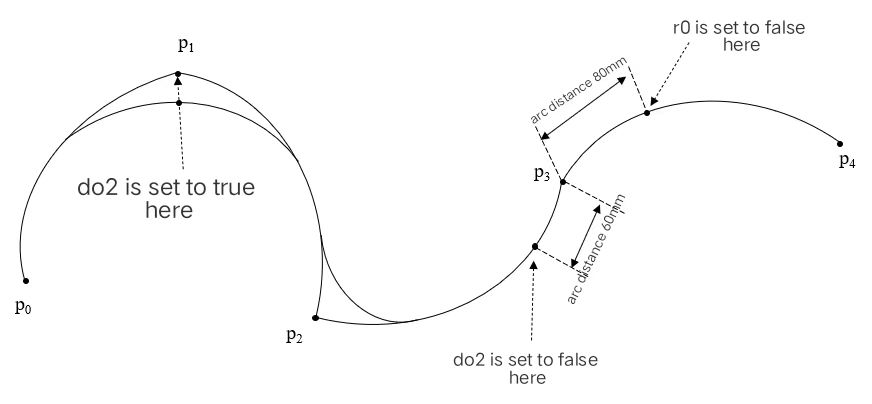
The forms of TrigJ and MoveJ are exactly identical, and both are commands that execute joint space motion. The difference is that TrigJ can execute predefined operations at several specified positions during the motion, with no difference in the number and meaning of other parameters. When the robot executes a MoveJ command, the trajectory of tcp is usually an arc. When triggering the Trigger signal, the distance of TrigJ is calculated as per the arc traveled by the tcp, see the example for details. |
Definition |
TrigJ (ToPoint, Speed, Trigger, Zone, Tool, [Wobj] ); ToPoint, target pose, data type: robtarget, the target pose described in the Cartesian space; Speed, data type: speed, to specify the motion speed of the robot when it executes MoveL, including the robot joint speed, translation speed of the robot end-effector, rotation speed, and motion speed of the external axis; Trigger, trigger condition and action, data type: trigdata; trigdata must be the trigdata processed with TrigX command; otherwise, the compiler will report an error when coming to this line; Zone, turning zone, data type: zone, to define the size of turning zone for the current trajectory; Tool, type: tool; [Wobj], work object, type: wobj, the work object used when executing this trajectory. When the tool is installed on the robot, this parameter can be ignored. When using external tools, this parameter must be specified, and the robot will calculate the motion speed and the size of turning zone by using the data stored in wobj. |
Example |
Example 1 VAR trigdata tc1; VAR trigdata tc2; VAR trigdata tc3; … //Set tc1, tc2, tc3 TrigIO (tc1, 0, true, do2, true); TrigIO (tc2, 60, false, do2, false); TrigReg (tc3, 80, true, r0, false); //r0 is a bool type register … //Motion MoveJ (p1,v500, z50, tool1); TrigJ (p2,v500, tc1, z50, tool1); TrigJ (p3,v500, tc2, fine, tool1); TrigJ (p4,v500, tc3, fine, tool1);
|