15.4.10 Communication commands
In the RL program, the robot can communicate with external devices through both Ethernet and serial ports. A unified set of commands is designed for resource management and data sending and receiving, which ensures consistent use experience.
Command set |
TCP client |
TCP server |
Serial port |
OpenDev |
Y |
Y |
Y |
SocketAccept |
N/A |
Y |
N/A |
CloseDev |
Y |
Y |
Y |
SendString |
Y |
Y |
Y |
SendByte |
Y |
Y |
Y |
ReadBit |
Y |
Y |
Y |
ReadByte |
Y |
Y |
Y |
ReadDouble |
Y |
Y |
N/A |
ReadInt |
Y |
Y |
N/A |
ReadString |
Y |
Y |
Y |
GetSocketConn |
Y |
N/A |
N/A |
GetSocketServer |
N/A |
Y |
N/A |
GetBufSize |
N/A |
N/A |
Y |
ClearBuffer |
Y |
Y |
Y |
15.4.10.1 OpenDev
Explanation |
It is used to open a listening server, initiate a connection as a client, and open a serial port resource, depending on the object indicated by the parameter. When opening the SocketServer object, the robot will initiate resource and complete port binding and port listening. When opening the SocketConn object, the robot will act as a TCP client and try to connect to the external server according to the preset ip and port. When opening the serial port resource, the serial port will be initialized according to the window parameters and communication conditions will be provided. |
Definition |
OpenDev(name); name, data type: string, the name of the client object or server object or serial port resource. |
Example |
Example 1 Example 2 If an error is reported, the control system will throw an exception and report the cause of the error. If the exception is not caught by the try block, the control system will stop the program. |
15.4.10.2 SocketAccept
Explanation |
It is used to block wait for client connections to arrive and complete client connection. This command is only used when the robot is acting as a TCP server. This command is only used when the robot is acting as a TCP server. |
Definition |
Return value, data type: SocketConn, after an external device connects to the robot as a TCP client, the control system generates a communication object that is used by the RL program to control communication read and write. SocketConn conn = SocketAccept(name); name, data type: string, the name of the SocketServer object that has been prepared and opened successfully using OpenDev. |
Example |
Example 1 If an error is reported, the control system will throw an exception and report the cause of the error. If the exception is not caught by the try block, the control system will stop the program. |
Attention |
|
15.4.10.3 CloseDev
Explanation |
It is used to close the resource, which can be used to close the TCP communication connection, TCP listening server, or serial port resource. |
Definition |
CloseDev(name); name, data type: string, SocketConn connection, listening server SocketServer object, or serial port resource used for communication. |
Example |
Example 1 Example 2 In Example 2, there are two network objects, and you must close the communication connection first and then the server object, otherwise it will generate a state of incomplete resource release (TCP TIME_WAIT state). If the robot has established multiple communication connections with external devices when it acts as a server, you need to close these communication connections in order before closing the server. In the case of incomplete resource release, the control system needs to be restarted. However, there is no need to worry too much, as there is redundancy in the number of resources allowed in the control system; this ensures the program runs properly after a small number of resources are occupied. However, it is necessary to avoid a large number of resources being occupied due to incorrect use. |
15.4.10.4 SendString
Explanation |
It is used to send a string outwards. It can be sent through the network or serial port, depending on the hardware resource represented by the identifier in the parameter. |
Definition |
SendString(StringData, name); StringData, data type: string, the string data to be sent. name, data type: string, the name of the hardware resource used to send the data. It can be the SocketConn object with an established TCP communication connection or the serial port resource successfully opened. |
Example |
Example 1 Send Hello World string outwards through Socket0. Socket0 is the SocketConn type that has been defined and successfully connected. Example 2 Sends the string Hello World stored in str1 outwards via Serial1. Serial1 is a defined and successfully opened serial port. |
15.4.10.5 SendByte
Explanation |
It is used to send a byte outwards. It is very useful when sending ASCII characters. |
Definition |
SendByte(ByteData, name, [length]); ByteData, data type: int, byte, or byte array, to send an unsigned byte or array from 0 to 255, mainly used for ASCII codes. name, data type: string, the name of the socket or serial port to send data. length, data type: int, to specify the first few bytes of the byte array to be sent, with optional parameters. If omitted, all bytes of the data will be sent by default. |
Example |
Example 1 Send a carriage return through socket0. Example 2 First define a byte variable data1, which is actually a carriage return. Then send the data outwards through serial0. Example 3 Send an array variable byte data2 through socket0. Sent all in the array. Example 4 Sends a byte variable of data2 through socket0, which represents the 2nd element of the array. The value 17 of data2 will be sent without sending any other elements. Example 5 |
15.4.10.6 ReadBit
Explanation |
The control system receives data by bit. 1) Received by TCP through network communication. The externally sent data should end with the terminator configured by SocketConn. 2) Received by serial communication. The external device only needs to send the data, with no requirement on the terminator. |
Definition |
Return value, data type: bool array, to store the received bit data using a bool array. Each bit corresponds to a bool member. Ret = ReadBit(BitNum, TimeOut, name); BitNum, data type: int, the number of bits that need to be read. The size should be an integer multiple of 8. TimeOut, data type: int, timeout period, in s, ranging from 0 to 86400 and 60s by default. name, data type: string, the name of the communication connection SocketConn or the serial port. Ret, data type: bool array, received data. The first element of the array indicates the lowest bit. |
Example |
Example 1 16 bit data is read by the ReadBit command and stored in a bool array named groupio with a timeout period of 60 seconds. Assume that the external device sends ASCII characters, 95 + terminator, the robot receives "95". As the hexadecimal values of "9" and "5" are 0x39 and 0x35 respectively, the data received by the user is 0x3935. At this time, the groupio array from [1] to [16] is 1001 1100 1010 1100. The [1] is the low bit of the data, which matches with 0x3935. |
15.4.10.7 ReadByte
Explanation |
It is used to receive data with a certain number of bytes. Note that the data needs to be separated by commas. |
Definition |
Return value, data type: byte array, to store the received data using a byte array. Ret = ReadByte(ByteNum, TimeOut, name); ByteNum, data type: int, the number of bytes to be read. TimeOut, data type: int, timeout period, in s, ranging from 0 to 86400 and 60s by default. name, data type: string, the name of the communication connection SocketConn or the serial port. Ret, data type: byte array, received data. |
Example |
Example 1 6-byte data is read and stored in a bool array named rets with a timeout period of 60 seconds. |
Attention |
|
15.4.10.8 ReadRawByte
Explanation |
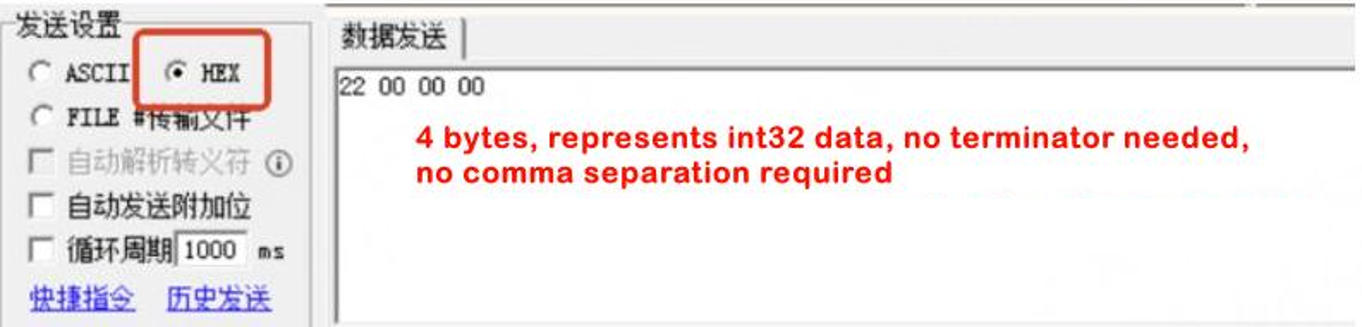
When the socket does not use a terminator (with the terminator set to empty), this command is used to directly read binary data from the data buffer. Difference from the ReadByte command: It does not require setting a terminator, and bytes do not need to be separated by commas. |
Definition |
bytes = ReadRawByte(length, timeout, socket_name); bytes, to store data read from ReadRawByte. Data type: byte array. length, read byte length. Data type: int. timeout, timeout period. Data type: int. socket_name, socket name. Data type: string |
Example |
Prerequisite: Create a socketserver variable in the variable list. Run the program and send data in hexadecimal through the network assistant:
HMI output result:
Hexadecimal 22 represents decimal 34. |

15.4.10.9 ReadDouble
Explanation |
It is used to receive double-type data via Socket. The sent data should end with the pre-defined terminator. Note: This command is only valid for TCP network communication and when robots act as the client/server, but not for serial ports. |
Definition |
Return value, data type: double array, to store the received data using a double array. Ret = ReadDouble(DoubleNum, TimeOut, name); DoubleNum, data type: double, the number of doubles to be read, up to 4, 096. TimeOut, data type: int, timeout period, in s, ranging from 0 to 86400, 60s by default. name, data type: string, the name of the Socket used to receive the data. |
Example |
Example 1 Read 10 double-type data and store them in a double array named dd with a timeout period of 60 seconds. |
15.4.10.10 ReadInt
Explanation |
It is used to receive int-type data via Socket. Externally sent data must end with the pre-defined terminator. Note that this command is only valid for TCP network communication and when robots act as the client/server, but not for serial ports. |
Definition |
Return value, data type: int, to store the received data using an int array. Ret = ReadInt(IntNum, TimeOut, name); IntNum, data type: int, the number of int to be read, up to 4, 096. TimeOut, data type: int, timeout period, in s, ranging from 0 to 86400 and 60s by default. name, data type: string, the name of the Socket used to receive the data. |
Example |
Example 1 10 int data are read and stored in an int array named ii with a timeout period of 60 seconds. |
15.4.10.11 ReadString
Explanation |
It is used to read a string and return it. Externally sent data should end with the pre-defined terminator. |
Definition |
Return value, data type: string, to store the received string. Ret = ReadString(TimeOut, name, [len]); TimeOut, data type: int, timeout period, in s, ranging from 0 to 86400 and 60s by default. name, data type: string, the name of the socket or serial port to receive data. len, data type: int, optional parameter, only used when reading through the serial port. Since the terminator is not defined in the serial port, it is necessary to specify the length before successful reading and parsing. |
Example |
Example 1 Receive a string from Socket1 and store it in str1 with a timeout period of 60 seconds. Network communication. Example 2 Receive a string for a length of 5 bytes from serial0 and store it in str1 with a timeout period of 60 seconds. Serial port communication. |
15.4.10.12 GetSocketConn
Explanation |
It is used to find the socket attribute set object using the socket connection name. The result obtained by this command can be used for judgment and processing logic. It should be used only as a read-only object. This command is only applicable to communication connections (including robot as client, or as a server which has been connected to the channel for communication), not for listening servers and serial ports. |
Definition |
Return value, data type: SocketConn, the socket attribute object found by given name. Ret = GetSocketConn(name); name, data type: string, the name of the communication connection SocketConn. Ret, data type: SocketConn, the socket attribute object found by given name. |
Example |
Example 1 Find SocketConn object with the name "client0". You can use ret to get the attributes of this connection, including the ip address, port number, communication terminator, and connection state. |
Queryable properties |
Query method |
Meaning and example |
ip address |
ret.ip |
String, e.g. "192.168.0.161" |
Port number |
ret.port |
integer, e.g. 8090 |
Attribute |
ret.attr |
Robot as server: "incoming". Robot as client: "outgoing". If the connection is not established: "" or other value, usually blank |
Cache size |
ret.cache |
1−100 |
Name |
ret.name |
In the given example, it is "client0" |
Connection state |
ret.state |
closed, established |
15.4.10.13 GetSocketServer
Explanation |
Find the corresponding server attribute set object with the user-defined name. The result obtained by this command can be used for judgment and processing logic. It should be used only as a read-only object. This command is only applicable to listening servers (SocketServer objects), not to communication connections (including robot as client, or as a server which has been connected to the channel for communication) and serial ports. |
Definition |
Return value, data type: SocketServer, the server attribute object found by given name. Ret = GetSocketServer(name); Name, data type: string, the name of communication connection SocketServer. Ret, data type: SocketServer, the socket attribute object found by given name. |
Example |
Example 1 / /Get the SocketServer object using the connection identifier "svr1", at this time ret will copy all the states of listener1 in Task 1 SocketServer ret= GetSocketServer("svr1"); if(ret.state == "listening") //Use SocketServer’s attr attribute to judge if listening is in underway / /Logic processing endif |
Queryable properties |
Query method |
Meaning and example |
ip address |
ret.ip |
String, e.g. "192.168.0.161" |
Port number |
ret.port |
integer, e.g. 8090 |
Name |
ret.name |
In the example above, it is "svr1" |
Connection state |
ret.state |
closed, listening, error |
15.4.10.14 GetBufSize
Explanation |
It is used to get the amount of data not read in the buffer of the serial port, in bytes. The command is only applicable to the serial port, not to the TCP server and the client. |
Definition |
Return value, data type: int, the amount of unprocessed data in the buffer, in bytes. Ret = GetBufSize(name); name, data type: string, the name of the serial port resource. Ret, data type: int, the amount of unprocessed data in the buffer, in bytes. |
Example |
Example 1 |
15.4.10.15 ClearBuffer
Explanation |
Clear the connected buffer, and any unread data will be lost. The serial port and socket data are supported. Data that has been split by the terminator and data that has not been split will be cleared. |
Definition |
ClearBuffer(name); name, data type: string, name of the link. |
Example |
Assuming that the terminator is +r, two copies of data have been received and one copy of data is being received. After executing this command, all the data in the buffer will be cleared, and the RL program can only read the re-sent data after clearing |
15.4.10.16 ReadOpcUaVarByName
Explanation |
It is used to read the value of OPC-UA custom variables by name. |
Definition |
ReadOpcUaVarByName(name, value); name, data type: string, the name of OPC-UA custom variables. value, data type: bool/byte/int/double/string, to store the value of OPC-UA custom variables that are read. If the type of the value does not match the type of the OPC-UA custom variable, it will be automatically converted. Note: When converting string to the value type, it is always 0. No return value. |
Example |
Example 1 |
15.4.10.17 WriteOpcUaVarByName
Explanation |
It is used to modify the value of OPC-UA custom variables by name. |
Definition |
WriteOpcUaVarByName(name, value); name, data type: string, the name of OPC-UA custom variables. value, data type: bool/byte/int/double/string, the modified value of OPC-UA custom variables. If the type of the value does not match the type of the OPC-UA variable, it will be automatically converted. Note: When converting string to the value type, it is always 0. |
Example |
Example 1 |