AR models
Using AR arms
Prerequisites
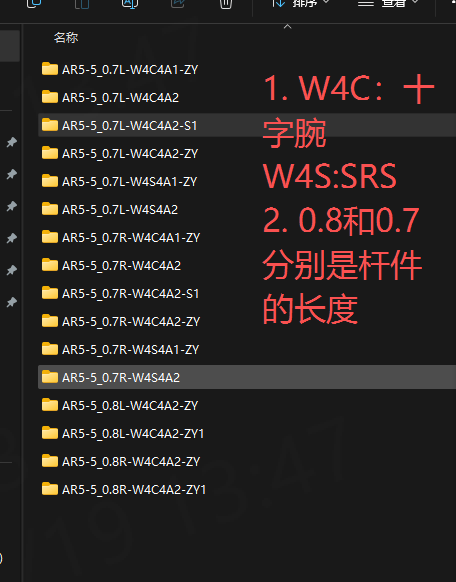
- AR models include cross-wrist and SR types, in left and right configurations (L / R). Customers usually choose side mount.
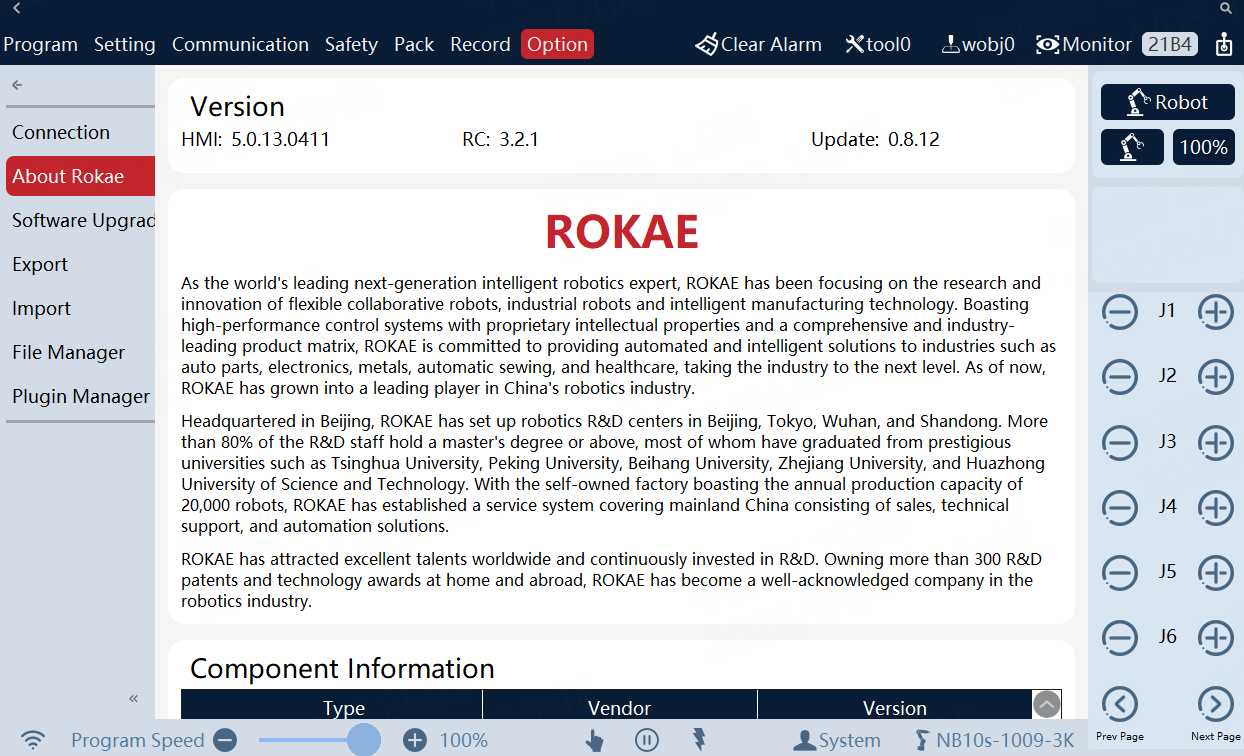
- Version requirements
Controller: 3.0.1.6.AR1124
SDK: librokae-v0.5.1.ar_9 and xcoresdk_python-v0.5.1.ar_9
-
Installation
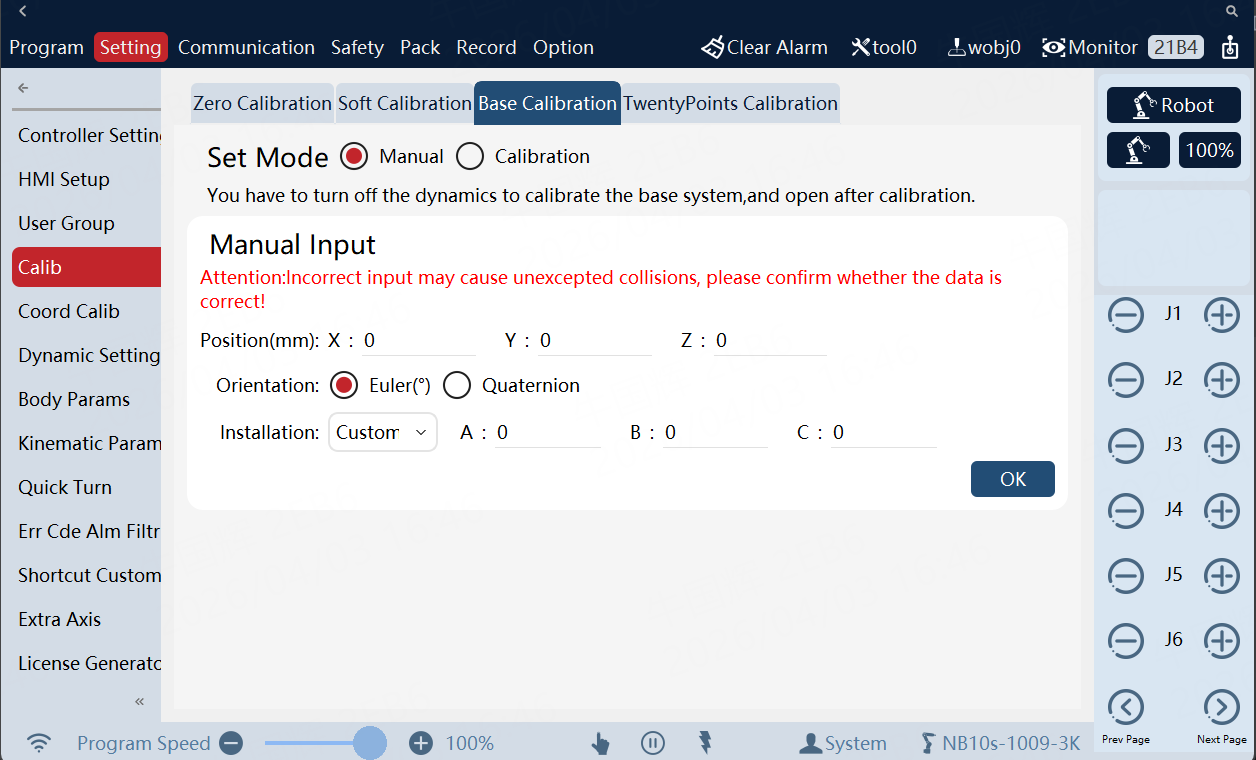
Left/right arms are often side-mounted (left arm base does not coincide with the world frame). Left and right side-mount parameters differ. Below: left arm.
Typical Demo usage
- Most AR use cases are teleoperation, dexterous hands, and grasping, with strict real-time needs — often Cartesian and joint control. Trajectory planning is critical: prioritize smooth motion and real-time performance (e.g. spline interpolation or trapezoidal velocity profiles).
- Respect AR IK characteristics so each target stays in workspace and avoids singularities. For teleop delay, tune packet-loss / network tolerance; for slow response, adjust timeout.
- Ensure host real-time performance: Minimum System and Network Requirements
- For other demos, see Scene Examples
Real-time mode — Cartesian position control
See demo: cartesian_impedance_control.cpp.
Notes
- Remove the following block:
// Force-control frame: tool relative to flange
std::array<double, 16> toolToFlange = {0, 0, 1, 0, 0, 1, 0, 0, -1, 0, 0, 0, 0, 0, 0, 1};
rtCon->setFcCoor(toolToFlange, FrameType::tool, ec);
// Cartesian impedance gains
rtCon->setCartesianImpedance({1200, 1200, 0, 100, 100, 0}, ec);
// 3 N desired force along X and Z
rtCon->setCartesianImpedanceDesiredTorque({3, 0, 3, 0, 0, 0}, ec);
- The shipped demo uses a 6-axis robot class; it will not run on 7-axis AR. Use:
rokae::xMateErProRobot robot(ip, "192.168.2.190");
The callback updates Cartesian pose in real time (you can inject pose from outside). Do not block: no sockets, heavy logging, or file I/O — only light computation that finishes within ~1 ms.
std::function<CartesianPosition(void)> callback = [&, rtCon]() -> CartesianPosition {
    time += 0.001;
    output.pos = init_position;
    output.pos[7] += delta_z;
    // ...
    if (time > 0.01) {
        std::cout << "Motion end: " << delta_z << std::endl;
        output.setFinished();
        stopManually.store(false);
        return output;
    }
    return output;
};
- Construct:
rokae::xMateErProRobot
- Set automatic mode, real-time mode, then power on (automatic first):
robot.setOperateMode(rokae::OperateMode::automatic, ec);
robot.setMotionControlMode(MotionControlMode::RtCommand, ec);
robot.setPowerState(true, ec);
- If a tool/workobject is mounted, set the tool/workobject frame
Toolset toolset1;
// ... configure toolset1 from teach pendant or code ...
robot.setToolset(toolset1, ec);
- Optional: move to a drag pose (adjust joint targets for AR):
std::array<double, 7> q_drag_xm7p = {0, M_PI / 6, 0, M_PI / 3, 0, 0, 0};
rtCon->MoveJ(0.5, robot.jointPos(ec), q_drag_xm7p);
- If packet loss is high, set network tolerance (often 20–30):
robot.setRtNetworkTolerance(50, ec);
-
Callback: keep it minimal — no delays, blocking, or heavy work, or scheduling suffers (slow motion, noise, lag).
-
The commanded Cartesian pose is a 4×4 matrix in the base frame; use helpers in
utility.hfor conversions.
std::function<CartesianPosition(void)> callback = [&, rtCon]() -> CartesianPosition {
    time += 0.001;
    constexpr double kRadius = 0.1;
    double angle = M_PI / 4 * (1 - std::cos(M_PI / 2 * time));
    double delta_z = kRadius * (std::cos(angle) - 1);
    CartesianPosition output{};
    output.pos = init_position;
    output.pos[7] += delta_z;
    if (time > 0.01) {
        std::cout << "Motion end: " << delta_z << std::endl;
        output.setFinished();
        stopManually.store(false);
    }
    return output;
};
- Start real-time control:
rtCon->setControlLoop(callback, 0, true);
rtCon->startMove(RtControllerMode::cartesianPosition);
rtCon->startLoop(true);
Real-time mode — joint control
See demo: joint_position_control.cpp.
Notes
-
See item 2 under Notes in Cartesian position control (7-axis class).
-
First five bullets same as Cartesian position control.
-
Callback outputs joint angles in radians. If you plan in Cartesian space, convert with
utility.h.
std::function<JointPosition()> callback = [&, rtCon]() {
    time += 0.001;
    double delta_angle = M_PI / 20.0 * (1 - std::cos(M_PI / 2.5 * time));
    JointPosition cmd = {{jntPos[0] + delta_angle, jntPos[1] + delta_angle, jntPos[2] - delta_angle,
                          jntPos[3] + delta_angle, jntPos[4] - delta_angle, jntPos[5] + delta_angle,
                          jntPos[6] - delta_angle}};
    if (time > 60) {
        cmd.setFinished();
    }
    return cmd;
};
- Start:
rtCon->setControlLoop(callback);
jntPos = robot.jointPos(ec);
rtCon->startMove(RtControllerMode::jointPosition);
rtCon->startLoop(true);
Forward / inverse kinematics
To avoid IK/FK failures at singularities, teach test points on the HMI first. If MOVL / MoveJ on the HMI reaches them, the SDK calls should work.
-
Connect
- Do not swap or mistype IPs.
- Use
xMateErProRobotfor 7-axis.
xMateErProRobot robot("192.168.2.160", "192.168.2.110");
- Automatic mode and power on
robot.setOperateMode(OperateMode::automatic, ec);
if (ec) {
    std::cout << "Set automatic mode failed: " << ec.message() << std::endl;
    return -1;
}
robot.setPowerState(true, ec);
if (ec) {
    std::cout << "Power on failed: " << ec.message() << std::endl;
    return -1;
}
- Tool/workobject frame
Toolset toolset1 = robot.toolset(ec);
print(std::cout, "Tool/workobject from controller:", toolset1);
- Joint angles
auto current_joints = robot.jointPos(ec);
if (ec) {
    std::cout << "Read joints failed: " << ec.message() << std::endl;
    return -1;
}
-
End pose
Usually includes tool; without tool, this is the flange pose.
auto current_cartesian_from_robot = robot.cartPosture(CoordinateType::endInRef, ec);
if (ec) {
    std::cout << "Read end pose failed: " << ec.message() << std::endl;
    return -1;
}
-
Disable axis-configuration option for IK
Default is off; if you bypass the HMI, set explicitly:
robot.setDefaultConfOpt(false, ec);
-
Forward kinematics
Use the joint angles obtained above.
auto fk_cartesian = robot.model().calcFk(current_joints, toolset1, ec);
if (ec) {
    std::cout << "FK failed: " << ec.message() << std::endl;
}
Compare printed values with the HMI.
-
Inverse kinematics
Use the end pose obtained above. If it fails, try the FK pose from the previous step.
auto ik_joints_m1 = robot.model().calcIk(endPos, toolset1, ec);
Model-library FK / IK
Can speed up IK to meet real-time control needs.
- Initialize joints
std::array<double, 7> zeros = {0, 0, 0, 0, 0, 0, 0};
auto jointPos_in = Utils::degToRad(std::array<double, 7>({5, 46, -10, 91, 1, -105, 11}));
std::array<double, 7> jointVel_in = {0.3, 0.2, 0.5, 0.4, 0.1, 0.1, 0.1};
std::array<double, 7> jointAcc_in = {1.3, 3.1, 4.1, 1.5, 1.6, 4.1, 8.1};
auto jointInit = Utils::degToRad(std::array<double, 7>({6, 45, -9, 92, 0, -103, 10}));
std::array<double, 7> array1{}, array2{}, array3{}, array4{};
- Forward kinematics
/**
 * @brief Cartesian pose from joint angles
 * @param[in] jntPos Joint angles
 * @param[in] nr Frame (default flange)
 * @return 4×4 pose, row-major
 */
std::array<double, 16> getCartPose(const std::array<double, DoF> &jntPos, SegmentFrame nr = SegmentFrame::flange);
auto pos = model.getCartPose(jointPos_in);
- Inverse kinematics (arm-angle search)
/**
 * @brief Search psi in [-PI, PI] for closest IK solution
 * @param[in] cartPos Flange Cartesian pose
 * @param[in] psi_accuracy Arm-angle resolution in degrees (e.g. 1, 10, 20); finer = slower
 * @param[in] elbow Reserved extension
 * @param[in] jntInit Seed joints
 * @param[out] jntPos Solution joints
 * @return Result code — see SDK docs (-1..-8)
 */
int getJointPosSearchPsi(const std::array<double, 16> &cartPos, const double &psi_accuracy, double elbow,
                         const std::array<double, DoF> &q_init, std::array<double, DoF> &q);
Example:
double psi = Utils::degToRad(-7.177);
double psi2 = Utils::degToRad(0);
std::array<int, 8> confData = {0, 0, 0, 0, 0, 0, 0, 0};
// timeval start;
// gettimeofday(&start, NULL);
auto ret1 = model.getJointPos(pos, psi, jointInit, array1);
auto ret2 = model.getJointPosSearchPsi(pos, 1, psi2, jointInit, array1);
Arm-angle search accuracy in the IK API must be > 0.
See the model-library demo above.
/**
 * @brief IK from pose; searches elbow in [-PI, PI]
 * @param[in] posture End pose in external reference (via setToolset)
 * @param[in] elb_accuracy > 0; smaller = finer search, slower. Often use > 10.
 */
std::array<double, DoF> calcIk_SearchElbow(CartesianPosition posture, double elb_accuracy, error_code &ec) noexcept;

std::array<double, DoF> calcIk_SearchElbow(CartesianPosition posture, const Toolset &tool_set, double elb_accuracy,
                                           error_code &ec) noexcept;
Arm-angle traversal is added to speed up IK.
int getJointPosSearchPsi(const std::array<double, 16> &cartPos, const double &psi_accuracy, double elbow,
                         const std::array<double, DoF> &q_init, std::array<double, DoF> &q);
AR real-time FAQs
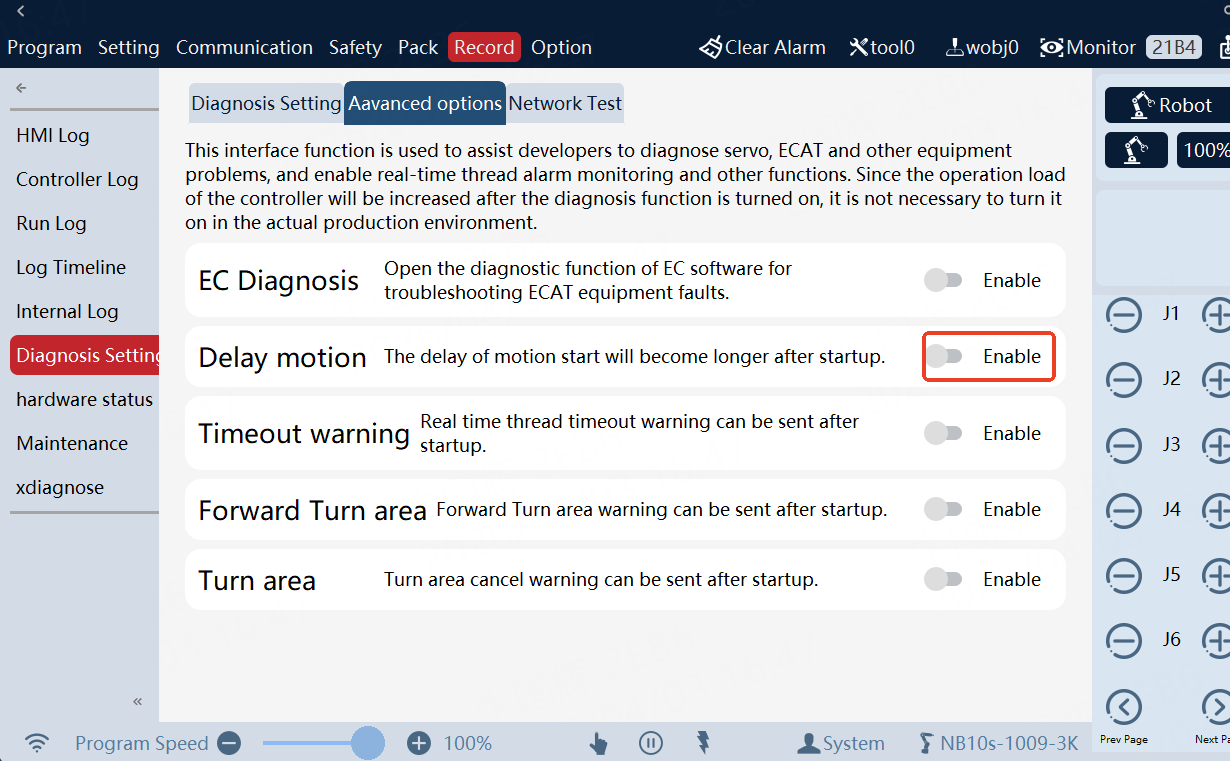
Left/right arms move at different speeds
Same version and config but different motion — check this switch on the HMI:
FK / IK failures
-
Confirm this HMI option is off:
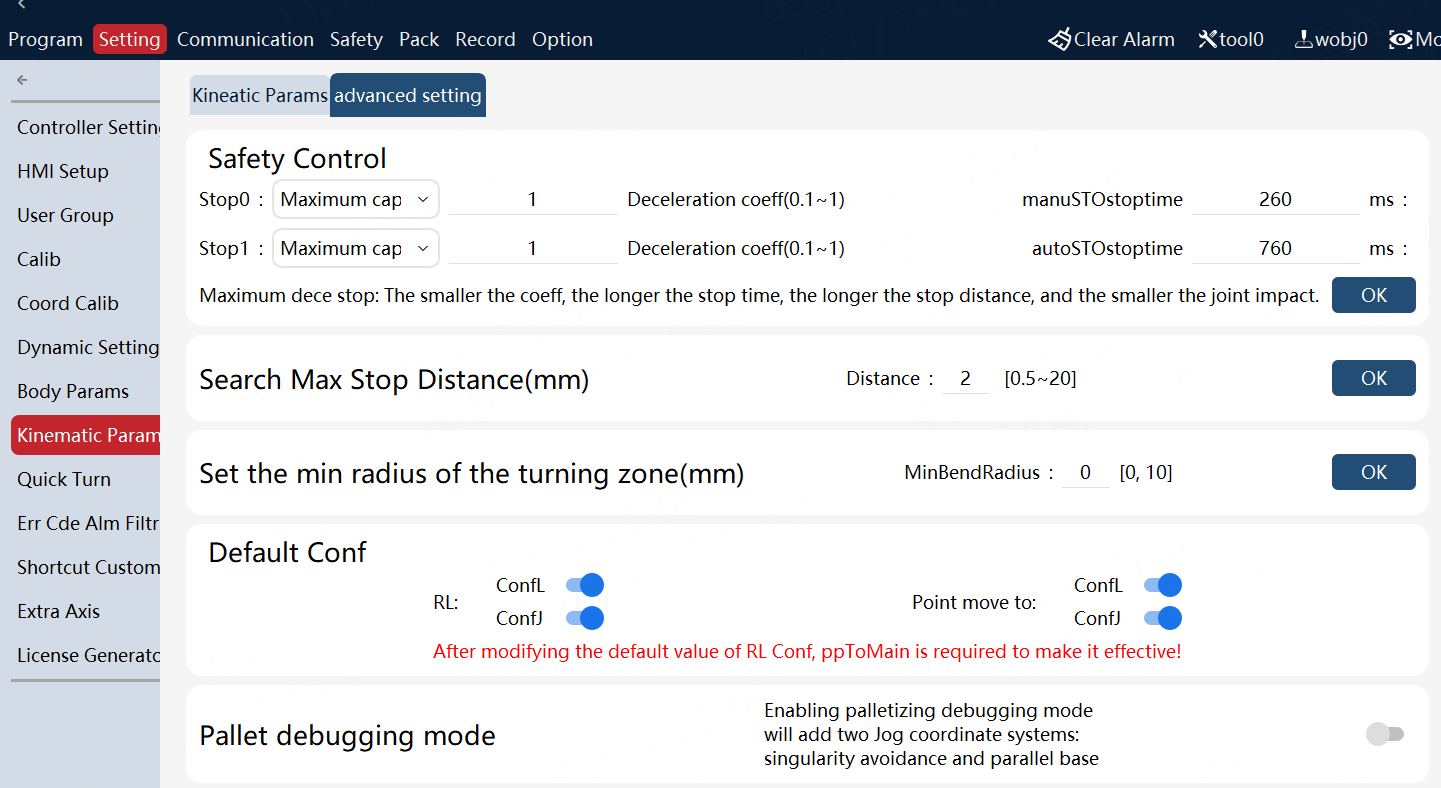
-
Call API to disable conf-based IK:
Disable axis-configuration option for IK
robot.setDefaultConfOpt(false, ec);