10.10 xPanel settings
xPanel settings can be used to configure the end-effector tool mode, end-effector RS485 communication parameters and timeout, and end-effector CAN communication parameters. This function is only applicable to the collaborative robot series xMate CR, xMate SR, xMate ER, and xMate AR.
On the HMI main interface, you can enter the xPanel settings interface through the menu "Communication" -> "xPanel settings".
10.10.1 End-effector mode settings
The mode settings function is only applicable to the collaborative robot series xMate CR and SR. The interface is shown as follows:
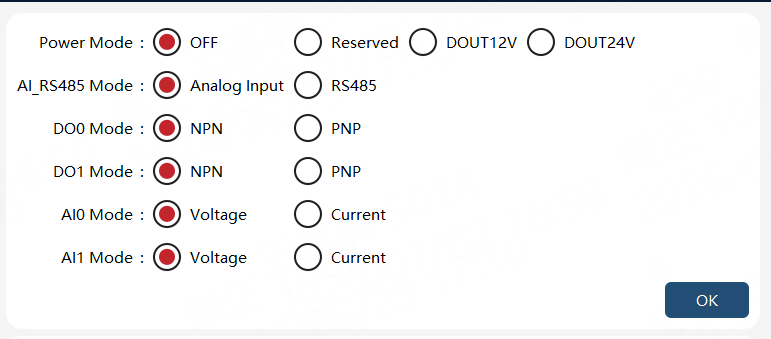
The parameters that can be set are shown in the table below:
| Parameters | Explanation |
|---|---|
External power supply mode |
Set the external power supply mode of the end-effector |
Analog input or RS485 mode selection |
Select whether the end-effector uses analog input or RS485 serial port |
Digital output DO0 mode |
Set the corresponding end-effector DO output to NPN or PNP mode |
Digital output DO1 mode |
Set the corresponding end-effector DO output to NPN or PNP mode |
Analog input AI0 mode |
Set the corresponding analog input to voltage or current type |
Analog input AI1 mode |
Set the corresponding analog input to voltage or current type |
After setting the required parameters, click the "OK" button, and the settings will take effect.
|
Note: The voltage or current type of the externally connected analog input signal must be consistent with the corresponding analog input mode; otherwise, unexpected errors may occur. |
10.10.2 End-effector RS485 communication parameters and timeout settings
The end-effector RS485 communication parameters and timeout settings function is only applicable to the collaborative robot series xMate CR, xMate SR, xMate ER, and xMate AR. The interface is shown as follows:
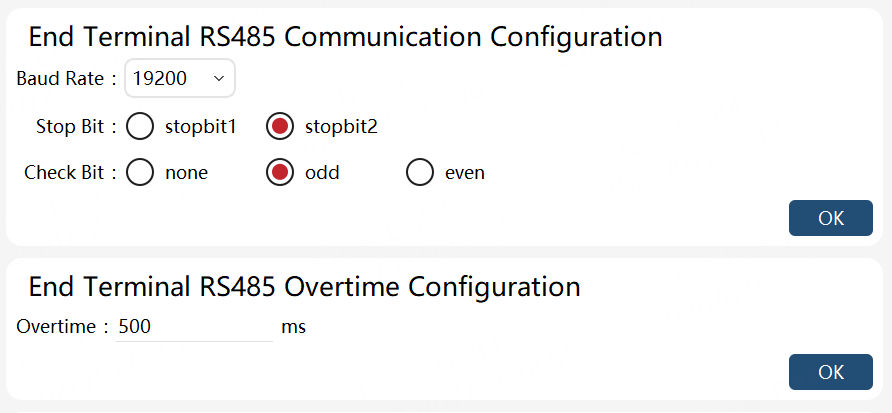
The parameters that can be set are shown in the table below:
| Parameters | Explanation |
|---|---|
Baud rate |
Set the baud rate of the end-effector. Optional values: 115200/9600/19200/38400/57600/230400/460800. For the xMate AR series, optional values: 4800/9600/19200/38400/57600/115200/2500000. |
Stop bit |
Set the stop bit of the end-effector. Optional values: 1 bit/2 bits. |
Parity bit |
Set the parity bit of the end-effector. Optional values: None/Odd/Even. |
Timeout |
Set the end-effector communication timeout. The value range is 50 to 10000, in milliseconds (ms). |
After configuring the parameters, click the "OK" button for the configuration to take effect. For the xMate AR series, a restart is required for the settings to take effect.
10.10.3 End-effector CAN communication parameters settings
The end-effector CAN communication parameters settings function is only applicable to the collaborative robot series xMate AR. The interface is shown as follows:

The parameters that can be set are shown in the table below:
| Parameters | Explanation |
|---|---|
Arbitration baud rate |
Set the arbitration baud rate of the end-effector CAN communication: 1M/500k/250k/125k. |
Data baud rate |
Set the data baud rate of the end-effector CAN communication. Optional values: 5M/4M/2M/1M. |
After configuring the parameters, click the "OK" button. A restart is required for the settings to take effect.
10.10.4 End-effector keypad settings
Select the point type to switch the teaching point type of the end-effector keypad.

The parameters that can be set are shown in the table below:
| Parameters | Explanation |
|---|---|
Joint |
Set the teaching point position type of end-effector keypad to joint type |
Cartesian |
Set the teaching point position type of end-effector keypad to Cartesian type |