Variable naming rules
Variable names in the RL language can consist of letters, underscores, and numbers, but must start with a letter or underscore "_". However, variable names cannot be the same as system keywords. You can see Keywords pre-definition for RL system keywords.
In addition, there are precautions as follows:
-
In the same module, GLOBAL and LOCAL level variables with duplicated names are not allowed.
-
In different modules, GLOBAL variables with duplicated names are not allowed.
-
In different modules, LOCAL variables with duplicated names are allowed.
-
In the same module, no variables (GLOBAL, LOCAL, excluding ROUTINE) are allowed to have naming conflicts with functions in this module.
-
In different modules, no naming conflicts of GLOBAL level functions and variables are allowed.
-
Starting from V4.0, system variables, project variables, and local variables are supported. Duplicate names are not allowed among system variables, project variables, and local variables. Variables in different local scopes may share the same name. See the description below for details.
|
When a variable name contains two characters only, it is important to note that the second character shall not be "h" or "b", otherwise, the variable may be converted to hexadecimal or binary. For more information, please refer to the Number system conversion. |
Variable scope
Starting from V4.0, scopes are classified as follows:
| Scope | Description |
|---|---|
System variable |
Controller-level global variable shared across all projects. Only the variable list, point list, and IO signal list support adding system variables. |
Project variable |
Accessible to all tasks within the current project. |
Local variable |
Limited to the current task. Depending on how it is declared, it can be a module-level local variable or a task-level local variable (see the examples below). Only the variable list and point list support adding local variables. |
Function-level variable (ROUTINE) |
Visible only within the current function. It can only be declared inside the function body, and the scope type (GLOBAL or LOCAL) must not be specified when declaring this kind of variable. |
Taking main.mod of task task0 as an example:
If a variable is declared with LOCAL in the declaration area, it is a module-level local variable and can only be used by functions in task task0, main.mod:
LOCAL int l_int0 = 10;
GLOBAL PROC main()

ENDPROC
If a variable is declared with GLOBAL, it is a task-level local variable and can be accessed by all .mod files under task0:
GLOBAL int int1 = 10;
GLOBAL PROC main()

ENDPROC
Different .mod files may contain module-level local variables with the same name, and they are independent of each other. For example, under task task0 there are test1.mod and test2.mod: add a local variable l_int0 (value 1) in test1.mod, and add a local variable l_int0 (value 10) in test2.mod. The two do not affect each other—test1.mod accesses l_int0 with value 1, and test2.mod accesses l_int0 with value 10.
Version downgrade notes
Downgrade notes (V4.0 → V3.2)
V3.2 does not support local variables or system variables. If you downgrade a V4.0 project that uses these scopes to V3.2, note that:
-
Local variables become project variables. If the original project contains multiple local variables with the same name (for example, module-level local variables with the same name in different
.modfiles), they become multiple project variables with the same name after downgrade, which may cause an error when loading the project. Handle this according to the error message. -
After downgrade, the hold values of original project-level pers variables are retained; the pers hold values of local variables are lost.
-
After downgrade, all system variables are lost.
|
Before downgrading from V4.0 to V3.2, back up the project and confirm the naming of local variables and system variables as well as pers hold requirements, to avoid data loss or load failure. |
Storage type
Each variable can be divided into three kinds: VAR (Variable), PERS (Persistent Variable), and CONST (Const Variable), depending on whether it can be modified during program execution.
| Type | Description |
|---|---|
VAR (Variable) |
Variable that can be re-assigned during program execution. |
CONST (Const Variable) |
Constant variable that cannot be re-assigned during program operation. The value of this type of variable must be specified at initialization. |
PERS (Persistent Variable) |
Persistent variable. During program execution, if the value of this type of variable changes, the initial value of the variable is automatically updated to the current value, achieving "persistent" storage. Note: Even if the value of a PERS type variable is changed while the program is running, the initial value displayed in the program editor declaration area is not immediately refreshed; the initial value displayed in the program editor declaration area is updated to the latest value only when the program reloads or stops. Regardless of whether the program is running or not, only the initial value of the PERS variable can be viewed in the "Variable Management" interface; its current value can be viewed through status monitoring or the print command. |
Keywords pre-definition
The following are reserved keywords (case insensitive) that are predefined for the RL language:
Module |
EndModule |
Proc |
EndProc |
Func |
EndFunc |
SetDO |
DOALL |
SetGO |
SetAO |
WaitDI |
Wait |
WaitUntil |
WaitWObj |
WBID |
Q |
P |
J |
V |
W |
T |
S |
L |
CA |
DURA |
IGNORELEFT |
EJ |
IJ |
FCBV |
FCCV |
FCOL |
FCXYZ |
FCCART |
PE |
PER |
TCP |
ORI |
EXJ |
CFG |
PDIS |
JDIS |
MoveAbsJ |
MoveJ |
MoveL |
MoveC |
MoveT |
LOCAL |
TASK |
GLOBAL |
VAR |
CONST |
PERS |
INV |
DOT |
CROSS |
sin |
cos |
tan |
asin |
cot |
acos |
atan |
atan2 |
sinh |
cosh |
tanh |
ln |
log10 |
pow |
exp |
sqrt |
ceil |
floor |
abs |
rand |
GetCurPos |
PrintToFile |
ClkRead |
TestAndSet |
|
IF |
Else |
Endif |
WHILE |
ENDWHILE |
for |
from |
to |
endfor |
Break |
Continue |
Del |
Int |
Double |
Bool |
String |
BYTE |
Robtarget |
Speed |
Zone |
Tool |
Wobj |
Jointarget |
TriggData |
Load |
FCBoxVol |
FCSphereVol |
FCCylinderVol |
FCXyzNum |
FCCartNum |
Pose |
CLOCK |
INTNUM |
SYNCIDENT |
TASKS |
Call |
Return |
EXIT |
Pause |
StopMove |
StartMove |
StorePath |
RestoPath |
True |
False |
Interrupt |
When |
Offs |
CalcJointT |
CalcRobT |
CRobT |
RelTool |
SocketCreate |
SocketClose |
SocketSendByte |
SocketSendInt |
SocketSendString |
SocketReadString |
SocketReadBit |
SocketReadInt |
SocketReadDouble |
AccSet |
MotionSup |
TriggIO |
TriggJ |
TriggL |
TriggC |
On |
Off |
clock |
intnum |
userframe |
pinf |
ninf |
FCFRAME_WORLD |
FCFRAME_TOOL |
FCFRAME_WOBJ |
FCFRAME_PATH |
FCPLANE_XY |
FCPLANE_XZ |
FCPLANE_YZ |
FC_LINE_X |
FC_LINE_Y |
FC_LINE_Z |
FC_ROT_X |
FC_ROT_Y |
FC_ROT_Z |
Offs |
CalcJoint |
CalcRobT |
CRobT |
RelTool |
Start |
Time |
ClkReset |
ClkStart |
ClkStop |
CONNECT |
WITH |
IDisable |
IEnable |
ISignalDI |
Single |
SingleSafe |
WaitWobj |
DropWobj |
WobjIdentifier |
WobjAngle |
ActUnit |
DeactUnit |
INTNO |
Exp |
DoubleToStr |
WaitSyncTask |
FCAct |
FCDeact |
FCLoadID |
FCCalib |
FCSupvForce |
FCSupvTorque |
FCSupvPosBox |
FCSupvPosSphere |
FCSupvPosCylinder |
FCSupvOrient |
FCSupvOrient |
FCSupvReoriSpeed |
FCSupvTCPSpeed |
FCCondForce |
FCCondTorque |
FCCondOrient |
FCCondReoriSpeed |
FCCondPosBox |
FCCondPosCylinder |
FCCondPosSphere |
FCCondTCPSpeed |
FCCondWaitWhile |
FCRefLine |
FCRefRot |
FCRefSpiral |
FCRefCircle |
FCRefForce |
FCRefTorque |
FCRefStart |
FCRefStop |
FCSetSDPara |
Number system conversion
The RL language supports direct entry of hexadecimal, binary, or values of scientific notation by adding a number system identifier after a number or letter.
Example 1: After the "h" suffix is added after 0−9, a−f, or A−F, the RL compiler treats the corresponding number or letter as hexadecimal and converts it to decimal in the compiler. For example:
-
8hstands for 8 in hexadecimal and 8 in decimal -
bhstands for b in hexadecimal and 11 in decimal -
25hstands for 25 in hexadecimal and 37 in decimal
Example 2: After the "b" suffix is added after 0−9, a−f, and A−F, the RL compiler treats the corresponding number or letter as binary. For example:
-
1bstands for 1 in binary and 1 in decimal -
10bstands for 10 in binary and 2 in decimal -
1010bstands for 1010 in binary and 10 in decimal
Example 3: Adding the "e±x" after a number indicates that the number is multiplied by 10 to the x power. For example:
-
5e+20represents 5 × 10^20 -
26e-15represents 26 × 10^(-15) -
112e-10represents 112 × 10^(-10)
Variable declaration
A declaration must be made before using a variable. The format of the variable declaration command is as follows:
SCOPE STORAGE TYPE varname [= value]
Where:
1. SCOPE refers to variable scope. Please refer to Variable Scope;
2. STORAGE refers to variable storage type. Please refer to Storage Types;
3. TYPE refers to variable type, and can be a basic type or a special type. Please refer to Variable Type;
4. varname is the variable name. Please refer to Variable Naming Rules;
The content in square brackets [ ] is optional and can be either initialized or not when variables are declared. For variables that are not explicitly initialized when they are declared, the system automatically assigns different initial values as per the type of the variables. The default initial value may cause program execution problems in some cases, so it is recommended to initialize each manually added variable.
Examples:
There are a few examples of variable declarations as follows:
// Example 1
VAR int counter = 8;      // Declare the integer variable counter and assign an initial value of 8
VAR double time = 2.5;    // Declare floating-point variable time and assign an initial value of 2.5
VAR bool ifOpen = true;   // Declare the bool type variable ifOpen and assign the initial value of true

// Example 2: In general, duplicate names are not allowed for variables
VAR int counter = 8;
VAR double counter = 2.5;  // The compiler will report an error, prompting "Failed to add variable"

// Example 3: Starting from V4.0, the same variable name is not allowed across different scopes either
VAR int counter = 1;       // Local variable
GLOBAL int counter = 555; // Global variable (the compiler will report an error)|
Starting from V4.0, variables in different scopes are also not allowed to have duplicate names. Rename the variables according to the compiler error message to avoid naming conflicts. |
Use restrictions:
-
The ROUTINE variable that declares the PERS storage type is not supported.
-
Starting from V4.0, when variables or functions at different levels have duplicate names, the compiler reports an error directly during syntax checking and no longer applies scope-priority shadowing. Duplicate names are also not allowed among system variables, project variables, and local variables. Rename them according to the error message.
User variable hold
The user variable "a" with hold is created in an RL project. This user variable is marked as a PERS variable, then the value of this variable is held on the non-volatile storage media when RL stops, the robot restarts, shuts down, or is powered off. When the robot is powered on again or RL is running again, the value of variable a is restored to the value held. The initial value is assigned only when the variable is created for the first time or re-edited.
|
Only PERS variables added to the variable list possess the hold attribute. PERS variables defined in the variable declaration area have no hold attribute. |
The persistence is supported for the following user variable types: Int, byte, double, bool, string, pose, speed, zone, fcboxvol, fcspherevol, fccylindervol, fcxyznum, fccartnum, and torqueinfo.
When the user variable persistent configuration is on the RL project interface, the entries where persistent variables can be created are shown in the red boxes below:
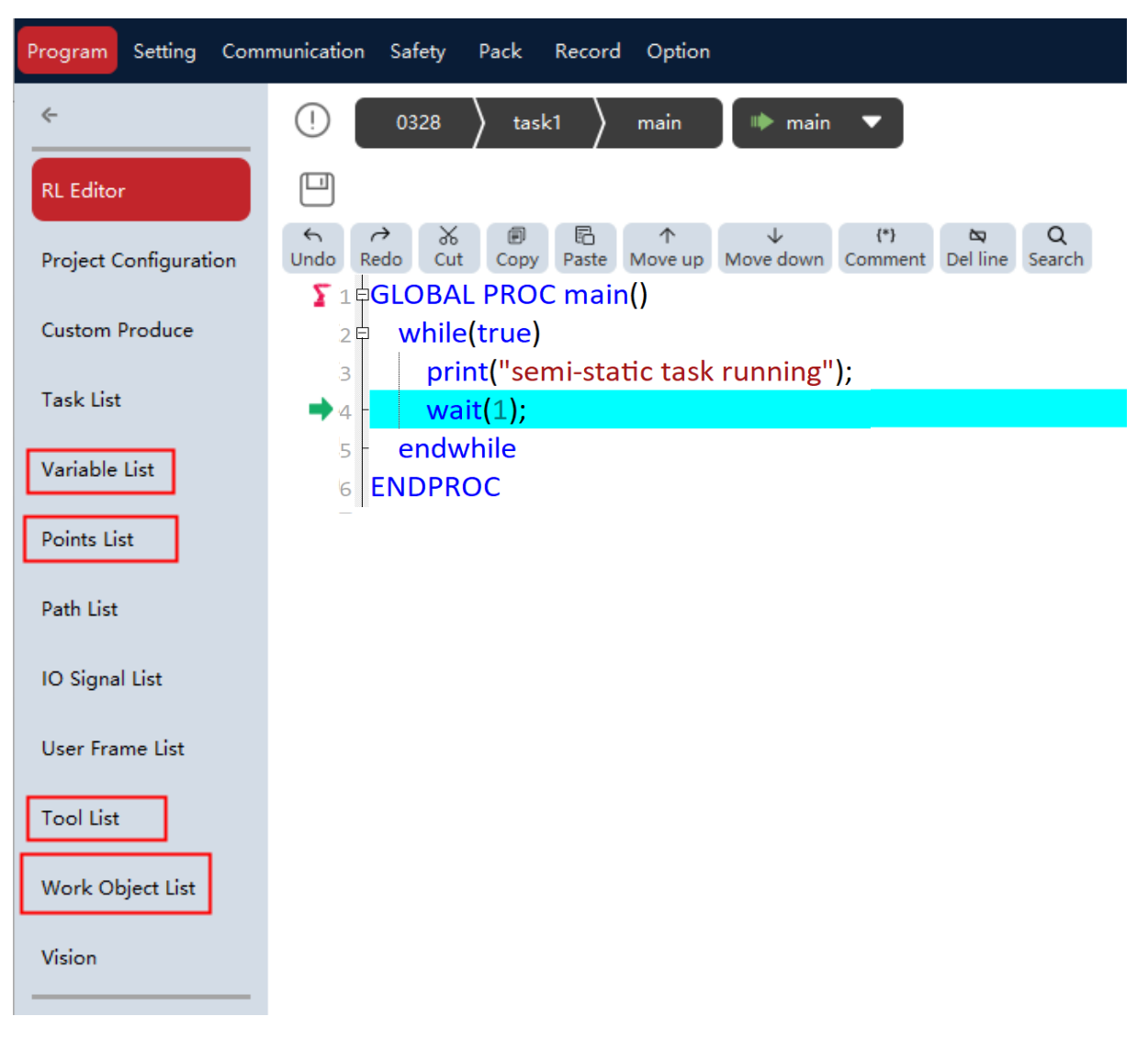
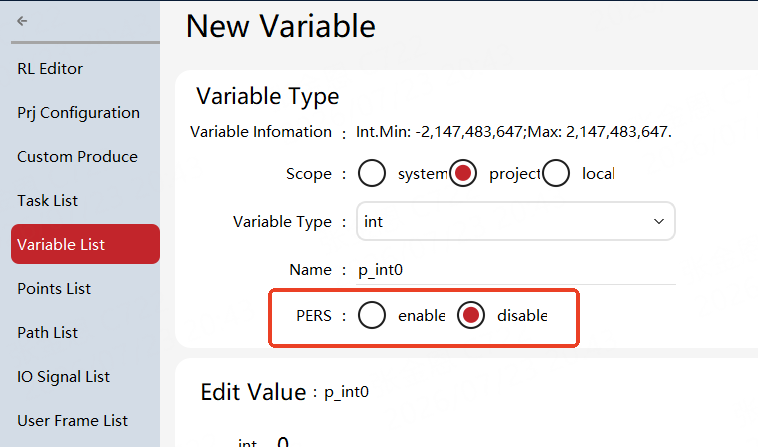
Click the variable list, point list, tool list, or work object list to create user variables of the corresponding type. All variables for which the persistent attribute can be created have a "persistent" attribute item, where "yes" indicates that the variable is a persistent variable, marked as a PERS variable. System variables are set as PERS variables by default and cannot be changed to non-PERS variables; project variables and local variables can be set as PERS variables.
Modification of PERS variable
The PERS variables of the xCore control system are stored in the form of initial value+hold value.
-
Initial value: The data input by users in the variable list.
-
Hold value: The data stored on the non-volatile storage medium after a hold variable is modified by the program during program execution.
The hold values of base types (int/bool/double) can be observed by status monitoring, and structure data (e.g., points, tools, work objects) can be printed by the print command.
During the operation of RL program, the PERS variable can be modified by the operator "=", and the modified data will be stored as a hold value within the controller. For the next time of program operation, the hold value of corresponding variable is preferred to be read, and if there is no hold value, the initial value of the variable is read.
If the PERS variable is modified by the point update button or the editing function of the variable list, the initial value and hold value are modified at the same time.
Variable list operation
The variable list provides creating, viewing, modification, and deletion of almost all variables in the robot system. Creating system variables, project variables, and local variables is supported.
Variable viewing
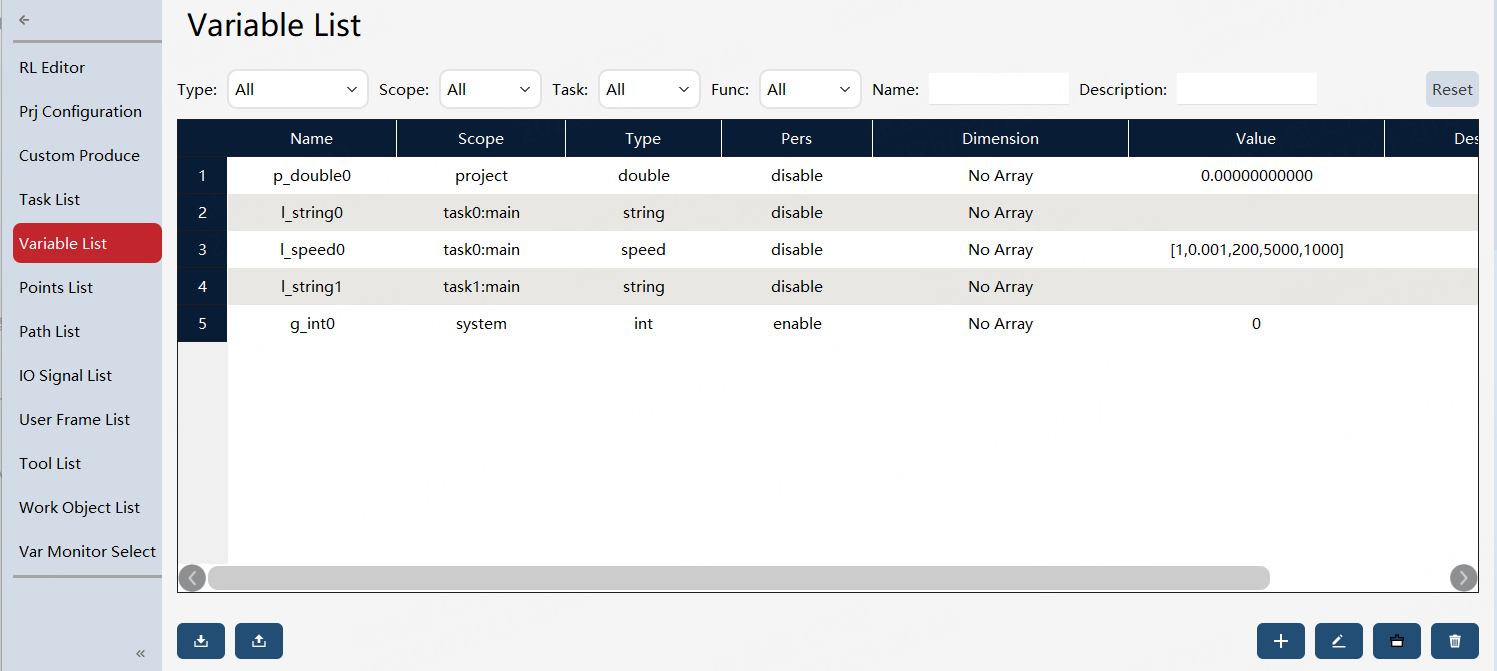
For some types of variables that have specifically defined steps, such as speed/zone (defined and modified on the auxiliary programming interface), although such variables can be viewed and modified in the Variable View interface, it is still recommended to use the dedicated interface for modification for the sake of convenient operation and fewer errors. The variable management interface should be used primarily for viewing operations. The variable list supports filtering variables by scope and displays the scope of each variable, as shown below.
|
The display range of project variables and local variables depends on the currently loaded robot program. After another program is loaded, the list contents of these two types of variables change. System variables are controller-level global variables. They can be created, viewed, modified, and deleted in the variable list, and are not affected by switching the currently loaded program. |
Variable editing
If you need to add variables or modify certain existing variables, you can click the "New" or "Modify" button to enter the variable editing page for relevant operation.
| Attribute | Description |
|---|---|
Type |
Used to select variable types when creating new variables. All supported types are listed in the sidebar on the left. |
Name |
Enter the variable name. |
Scope |
Select the variable scope: system variable, project variable, or local variable. When local variable is selected, you must also specify the task and mod. When creating a variable, the system variable is prefixed with |
Dimension |
To create or modify arrays, supporting up to 3D arrays. |
Persistent |
Define as a persistent (pers) variable or non-persistent variable. |
Value |
Display the variable value. |
Description |
Provide a description of the variable. |